랭체인(LangChain)과 랭그래프(LangGraph)는 대규모 언어 모델(LLM)을 활용한 애플리케이션 개발을 위한 도구들입니다. 위 강의는 LangChain에서 운영하는 LangChain Academy에서 제작한 “Introduction to LangGraph” 강의의 내용을 정리 및 추가 설명한 내용입니다.
- 강의 링크 : https://youtu.be/29XE10U6ooc
- 랭체인 : https://www.langchain.com/
이번 포스트는 “Module2”내용을 다룹니다:
목차
- Lesson 1: State Schema
- Lesson 2: State Reducers
- Lesson 3: Multiple Schemas
- Lesson 4: Trim and Filter Messages
- Lesson 5: Chatbot w/ Summarizing Messages and Memory
- Lesson 6: Chatbot w/ Summarizing Messages and External Memory
Lesson 1: State Schema
LangGraph의 주요 개념과 구성 요소
-
그래프 구조:
- LangGraph는 에이전트 워크플로우를 그래프로 모델링합니다.
- 주요 구성 요소: State(상태), Nodes(노드), Edges(엣지)
-
StateGraph와 MessageGraph:
- StateGraph: 사용자 정의 State 객체로 매개변수화된 주요 그래프 클래스
- MessageGraph: State가 메시지 리스트로만 구성된 특수한 그래프 유형
-
상태 관리:
- TypedDict나 Pydantic 모델을 사용하여 상태 스키마 정의
- Reducer 함수를 통한 상태 업데이트 방식 정의
- 다중 스키마 지원: 내부 노드 통신, 입출력 스키마 분리 등
-
노드와 엣지:
- 노드: 그래프의 로직을 구현하는 Python 함수
- 엣지: 노드 간 연결과 실행 흐름을 정의
- 조건부 엣지를 통한 동적 라우팅
-
메시지 처리:
- add_messages 함수를 사용한 효율적인 메시지 관리
- MessagesState를 통한 간편한 메시지 상태 관리
-
그래프 실행:
- 컴파일 과정을 통한 그래프 구조 검증
- “super-steps”를 통한 이산적 실행 방식
-
유연성과 확장성:
- 다양한 상태 스키마 및 업데이트 방식 지원
- 복잡한 워크플로우 구현 가능
State Schema는 Langraph에서 에이전트가 처리하는 데이터의 구조와 타입을 정의하는 방식입니다. 이 스키마는 데이터의 형식을 지정하여, 그래프 내에서 데이터가 어떻게 처리되고 업데이트되는지를 제어합니다.
-
Langraph에서는
Typedict,Python Data Classes,Pydantic등 다양한 방법으로 스키마를 정의할 수 있습니다. 각각의 방법에 대해서 살펴보겠습니다.- Typedict: 주로 사용되는 방식으로, Python의 딕셔너리 형식을 기반으로 하여 키(key)와 해당 값의 타입을 지정합니다.
- 하지만 Typedict는 런타임에서 타입 검사를 하지 않아, 잘못된 값이 할당되어도 오류가 발생하지 않는 문제가 있습니다.
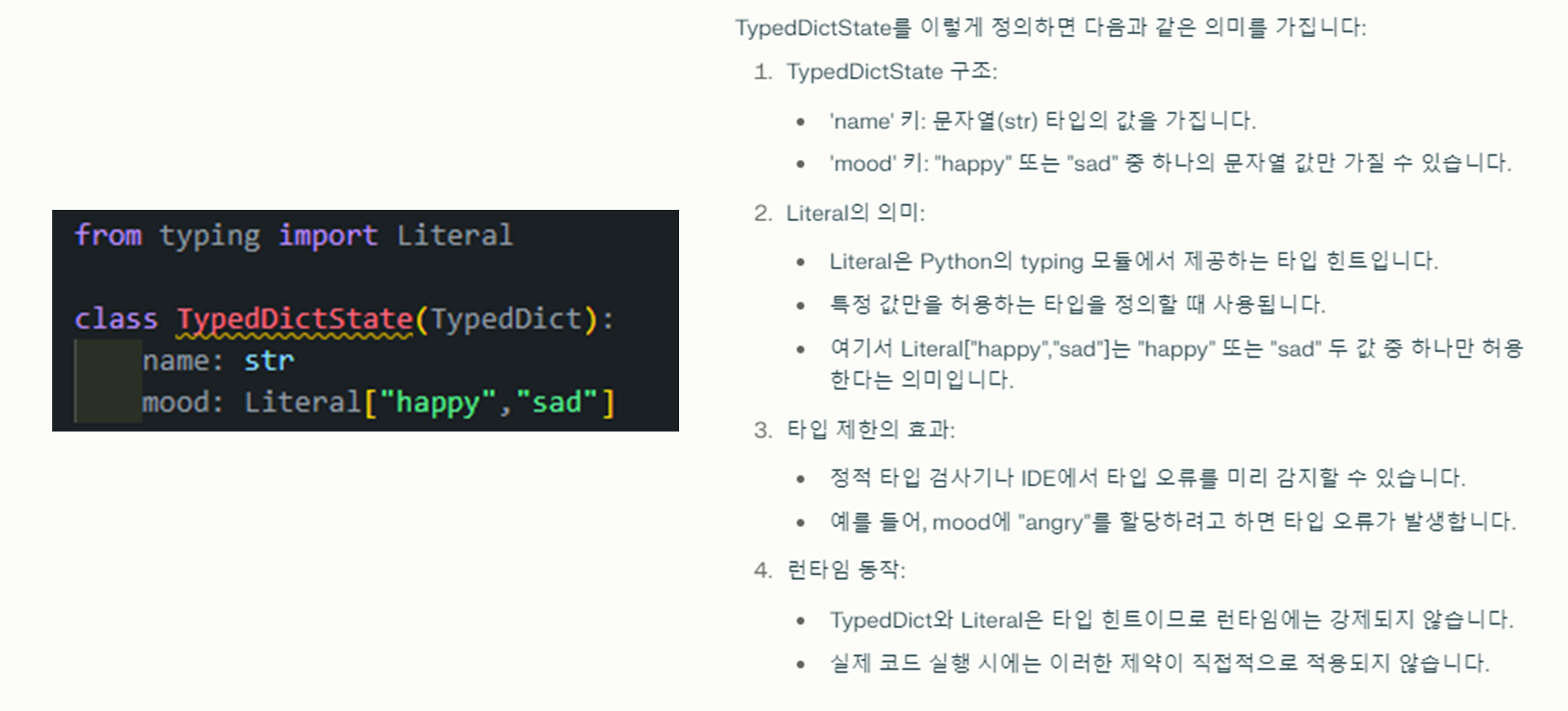
-
앞에 Module 1에서 나왔던 예시로 아래와 같은 예시가 있었습니다:
1
2
3
4
5
6
7
8
9
10
11
12
13
14
15
16
17
18
19
20
21
22
23
24
25
26
27
28
29
30
31
32
33
34
35
36
37
38
39
40
41
42
43
44
45
# Module 1 - TypeDict예시
import random
from IPython.display import Image, display
from langgraph.graph import StateGraph, START, END

def node_1(state):
    print("---Node 1---")
    return {"name": state['name'] + " is ... "}

def node_2(state):
    print("---Node 2---")
    return {"mood": "happy"}

def node_3(state):
    print("---Node 3---")
    return {"mood": "sad"}

def decide_mood(state) -> Literal["node_2", "node_3"]:

    # Here, let's just do a 50 / 50 split between nodes 2, 3
    if random.random() < 0.5:

        # 50% of the time, we return Node 2
        return "node_2"

    # 50% of the time, we return Node 3
    return "node_3"

# Build graph
builder = StateGraph(TypedDictState)
builder.add_node("node_1", node_1)
builder.add_node("node_2", node_2)
builder.add_node("node_3", node_3)

# Logic
builder.add_edge(START, "node_1")
builder.add_conditional_edges("node_1", decide_mood)
builder.add_edge("node_2", END)
builder.add_edge("node_3", END)

# Add
graph = builder.compile()

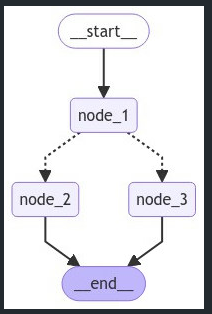
# View
display(Image(graph.get_graph().draw_mermaid_png()))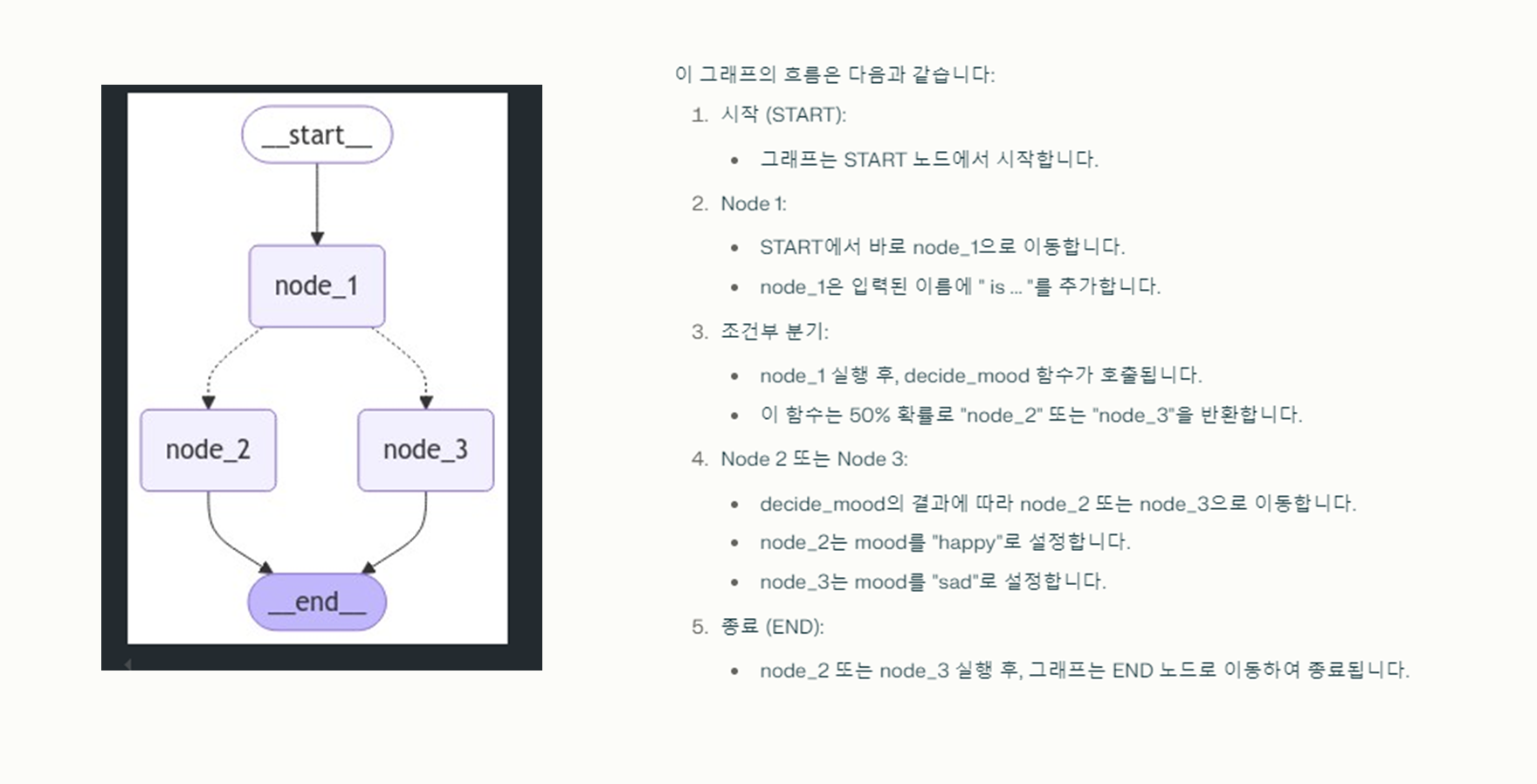
(참고) 일반 클래스
- 가장 기본적인 객체 지향 프로그래밍의 구조입니다.
- 속성과 메서드를 자유롭게 정의할 수 있습니다.
- init() 등의 메서드를 직접 구현해야 합니다.
- 캡슐화, 상속, 다형성 등의 OOP 개념을 완전히 활용할 수 있습니다.
(참고) TypedDict
-
Python 3.8부터 정식으로 도입되었습니다
(이전 버전에서는 typing_extensions 모듈을 통해 사용 가능).
- 딕셔너리의 키와 값에 대한 타입을 지정할 수 있게 해줍니다.
- 런타임에는 일반 딕셔너리처럼 동작합니다.
- 키에 대한 접근은 딕셔너리 문법을 사용합니다 (예:
obj["key"]). - 주로 정적 타입 검사를 위해 사용됩니다.
(참고) Dataclass
- Python 3.7부터 도입된 기능입니다.
- 데이터를 저장하기 위한 클래스를 쉽게 만들 수 있게 해줍니다.
- 자동으로 init(), repr(), eq() 등의 메서드를 생성합니다.
- 타입 힌팅을 지원합니다.
- 속성에 직접 접근 가능합니다 (예: obj.attribute).
- 불변성(immutability)을 쉽게 구현할 수 있습니다.
(참고) TypedDict vs Dataclass
-
주요 차이점으로는 속성 접근 방식이 다릅니다.
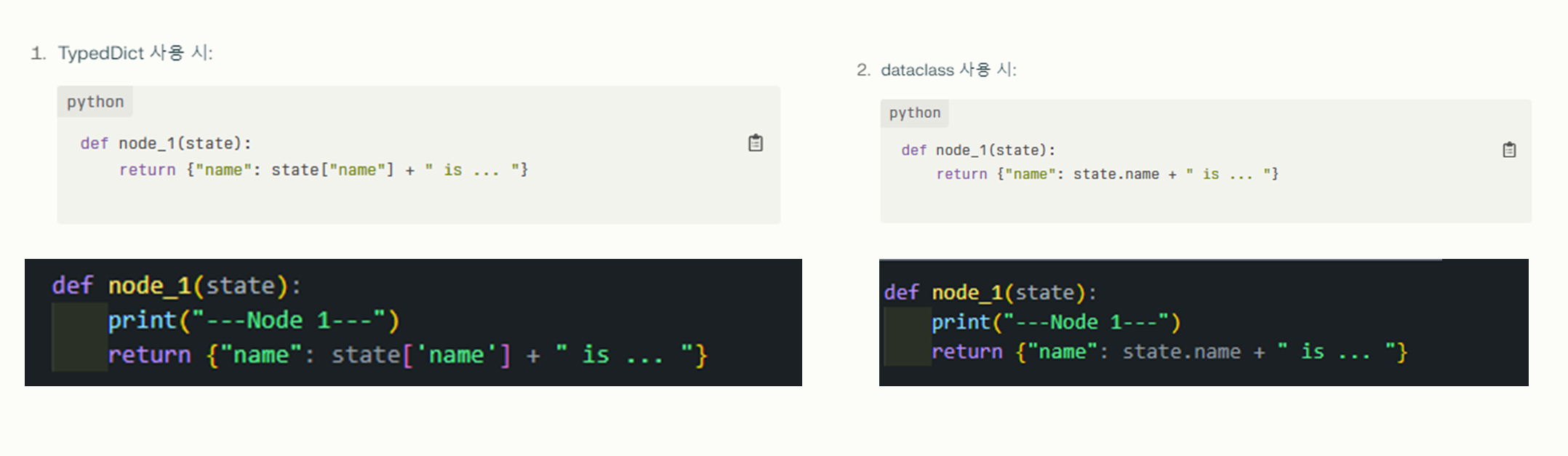
- TypedDict: 딕셔너리 스타일로 접근 (state[“name”])
- dataclass: 객체 속성 스타일로 접근 (state.name)
- Python Data Classes: 데이터 클래스는 더 간결한 구문을 제공하며, 속성에 접근할 때
dict대신dot(.)연산자를 사용할 수 있습니다.- 하지만 역시 타입 힌트가 런타임에 강제되지 않아 잘못된 값을 할당해도 오류가 발생하지 않습니다.
1 2 3 4 5 6 7 8 9 10 11 12 13 14 15 16 17 18 19 20 21
def node_1(state): print("---Node 1---") return {"name": state.name + " is ... "} # Build graph builder = StateGraph(DataclassState) builder.add_node("node_1", node_1) builder.add_node("node_2", node_2) builder.add_node("node_3", node_3) # Logic builder.add_edge(START, "node_1") builder.add_conditional_edges("node_1", decide_mood) builder.add_edge("node_2", END) builder.add_edge("node_3", END) # Add graph = builder.compile() # View display(Image(graph.get_graph().draw_mermaid_png()))- Pydantic: 런타임에서 데이터 유효성을 검사하는 기능을 제공합니다.
- Pydantic은 Python의 타입 힌팅을 사용하여 데이터 검증과 설정 관리를 제공하는 라이브러리입니다. LangGraph에서 상태 스키마를 정의할 때 특히 유용합니다.
- Pydantic 주요 특징
- 런타임 데이터 검증
- 복잡한 데이터 구조 지원
- 자동 문서화
- 설정 관리
- JSON 스키마 생성
-
아래는 실제 Pydantic 클래스를 선언하고 validation을 수행하는 코드입니다:
1
2
3
4
5
6
7
8
9
10
11
12
13
14
15
16
17
18
from pydantic import BaseModel, field_validator, ValidationError
# BaseModel 상속
class PydanticState(BaseModel):
    name: str
    mood: str # "happy" or "sad"

    @field_validator('mood')
    @classmethod
    def validate_mood(cls, value):
        # Ensure the mood is either "happy" or "sad"
        if value not in ["happy", "sad"]:
            raise ValueError("Each mood must be either 'happy' or 'sad'")
        return value

try:
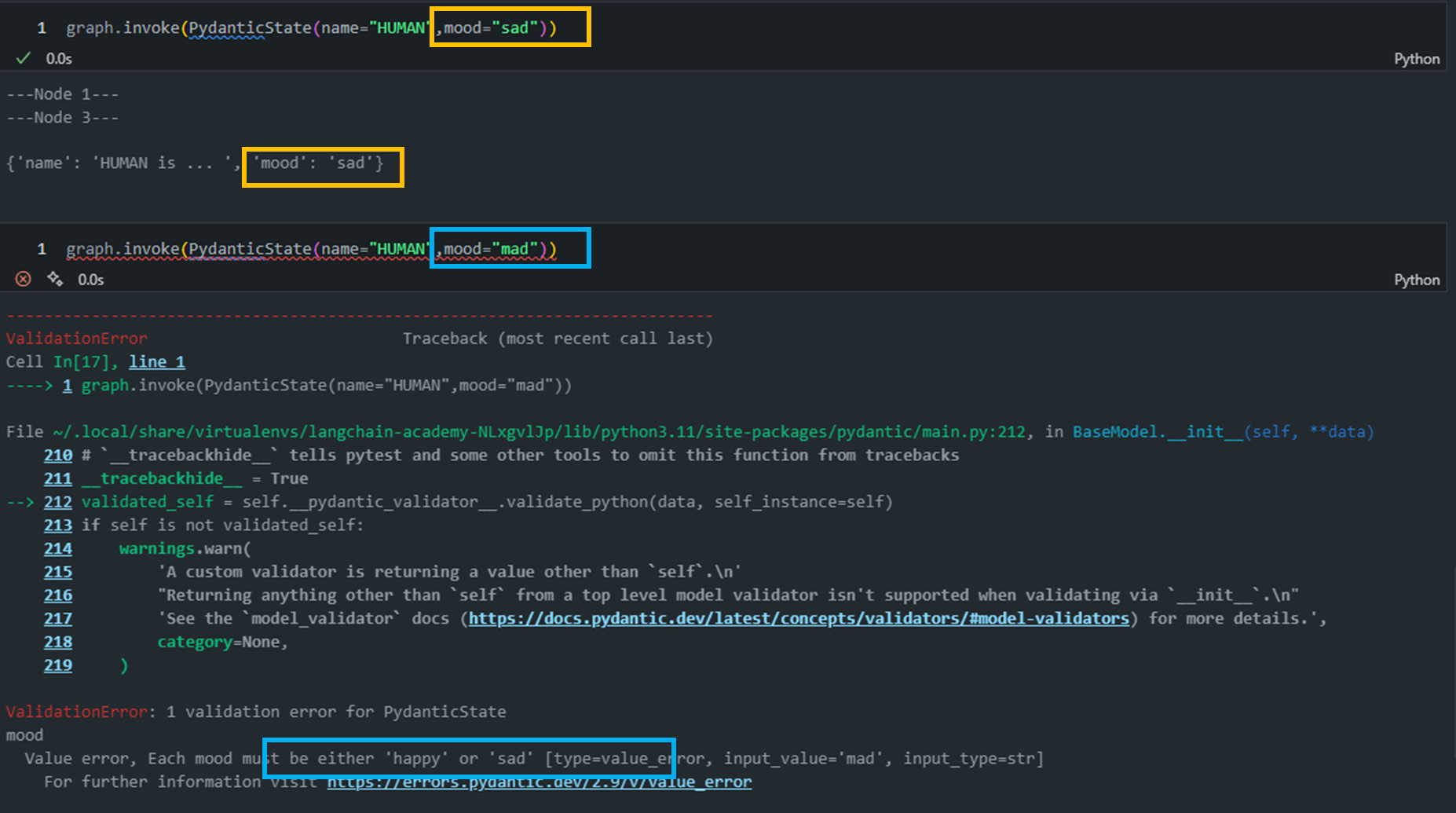
    state = PydanticState(name="John Doe", mood="mad")
except ValidationError as e:
    print("Validation Error:", e)
a. BaseModel 상속:
PydanticState(BaseModel): PydanticState 클래스는 Pydantic의 BaseModel을상속받아 정의됩니다.- 이를 통해 자동 검증, 직렬화, 역직렬화 기능을 사용할 수 있습니다.
b. 필드 정의:
name과mood필드를 str 타입으로 정의합니다.
c. @field_validator 데코레이터:
@field_validator 데코레이터: Pydantic 라이브러리에서 제공하는 기능입니다. Pydantic은 파이썬에서 데이터 모델을 정의하고 검증하는 데 사용됩니다.@field_validator는 특정 필드의 값이 맞는지 확인하는 로직을 직접 만들 수 있게 해줍니다.- 즉, 어떤 필드에 값이 들어왔을 때 그 값이 우리가 원하는 조건에 맞는지 자동으로 검사해주는 기능이에요.
- 예를 들어,
@field_validator('mood')라면, “mood“라는 필드에 값이 들어올 때, 그 값이 “happy”나 “sad” 중 하나인지 확인하고자 하는 목적으로 사용되었다고 보면 됩니다.
d. @classmethod:
- 클래스 자체에 대해 작업을 할 수 있게 만들어주는 데코레이터입니다.
- 일반적으로 메서드를 만들면 인스턴스(객체)를 사용해서 호출해야 하는데, 클래스 메서드는 인스턴스가 아닌 클래스 자체에 연결되어 실행됩니다.
- Pydantic에서 필드 검증을 할 때, 검증 메서드를 클래스 레벨에서 사용해야 하기 때문에 @classmethod가 필요로하게 됩니다.
- 즉, 인스턴스를 만들기 전에 필드 값을 확인해야 하기 때문에 클래스 전체에서 그 검증 로직에 접근할 수 있도록 @classmethod로 메서드를 정의하는 것이죠.
e. 예외 처리:
- 유효하지 않은 데이터로 인스턴스를 생성하려고 하면 ValidationError가 발생합니다.
-
아래 예시에서는 “mad”라는 유효하지 않은 mood 값을 사용하여 오류를 발생시킵니다.
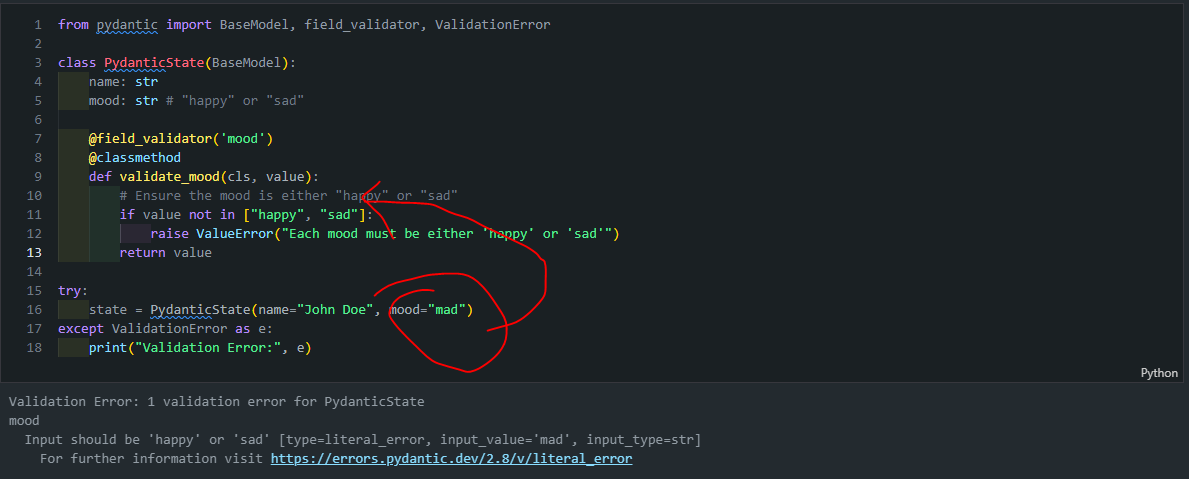
- Typedict: 주로 사용되는 방식으로, Python의 딕셔너리 형식을 기반으로 하여 키(key)와 해당 값의 타입을 지정합니다.
1
2
3
4
5
6
7
8
9
10
11
12
13
14
15
16
17
# Build graph
builder = StateGraph(PydanticState)
builder.add_node("node_1", node_1)
builder.add_node("node_2", node_2)
builder.add_node("node_3", node_3)

# Logic
builder.add_edge(START, "node_1")
builder.add_conditional_edges("node_1", decide_mood)
builder.add_edge("node_2", END)
builder.add_edge("node_3", END)

# Add
graph = builder.compile()

# View
display(Image(graph.get_graph().draw_mermaid_png()))
Lesson 2: State Reducers
앞에 Module 1에서 설명했던 State Reducer에 대해서 더욱 자세하게 설명합니다. 아래 예시는 TypeDict를 사용할 때 발생할 수 있는 상태 업데이트 충돌 문제입니다.
1
2
3
4
5
6
7
8
9
10
11
12
13
14
15
16
17
18
19
20
21
22
23
24
25
26
27
28
29
30
31
32
33
34

class State(TypedDict):
    foo: int

def node_1(state):
    print("---Node 1---")
    return {"foo": state['foo'] + 1}

def node_2(state):
    print("---Node 2---")
    return {"foo": state['foo'] + 1}

def node_3(state):
    print("---Node 3---")
    return {"foo": state['foo'] + 1}

# Build graph
builder = StateGraph(State)
builder.add_node("node_1", node_1)
builder.add_node("node_2", node_2)
builder.add_node("node_3", node_3)

# Logic
builder.add_edge(START, "node_1")
builder.add_edge("node_1", "node_2")
builder.add_edge("node_1", "node_3")
builder.add_edge("node_2", END)
builder.add_edge("node_3", END)

# Add
graph = builder.compile()

# View
display(Image(graph.get_graph().draw_mermaid_png()))
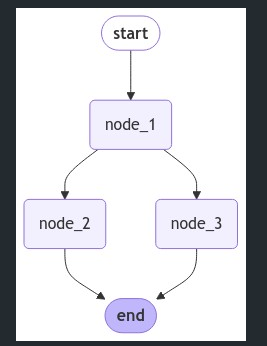
위 그림를 해석해보면 node_1은 node_2와 node_3으로 분기됩니다. node_2와 node_3는 병렬로 실행됩니다. 아래 코드를 실행해보면 다음과 같은 에러가 발생합니다.
1
2
3
4
5
from langgraph.errors import InvalidUpdateError
try:
    graph.invoke({"foo" : 1})
except InvalidUpdateError as e:
    print(f"InvalidUpdateError occurred: {e}")
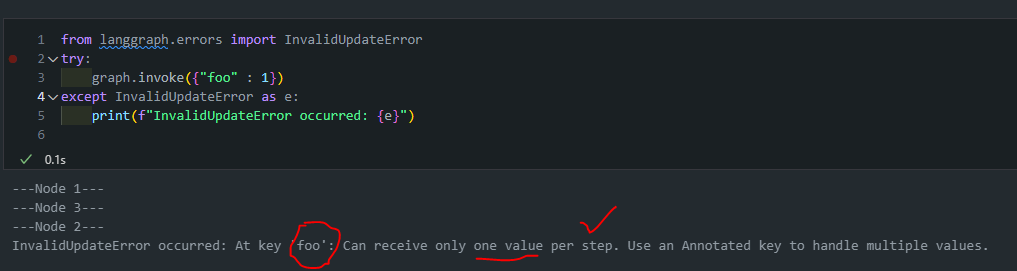
상태 업데이트 문제:
- 각 노드는 ‘foo’ 값을 1씩 증가시키려 합니다.
- node_2와 node_3가 동시에 실행되면서 둘 다 ‘foo’ 값을 업데이트하려 합니다.
충돌 발생:
- 병렬 실행 중 두 노드가 같은 키(‘foo’)를 동시에 업데이트하려 합니다.
- LangGraph는 이런 상황에서 어떤 업데이트를 적용해야 할지 결정할 수 없습니다.
-
이러한 충돌 상황에서 LangGraph는
InvalidUpdateError를 발생시킵니다.1 2 3 4 5 6
We see a problem! Node 1 branches to nodes 2 and 3. Nodes 2 and 3 run in parallel, which means they run in the same step of the graph. They both attempt to overwrite the state *within the same step*. This is ambiguous for the graph! Which state should it keep?
- 이러한 충돌을 해결하기 위해서는 상태 업데이트 방식을 명확히 정의해야 합니다.
이때 사용되는 것이 바로 기본 Reducer 함수입니다.
-
Reducer는 LangGraph에서 상태(State) 업데이트를 처리하는 함수입니다.
업데이트 명시적으로 정의: 노드에서 반환된 업데이트를 현재 상태에 어떻게 적용할지 정의합니다.발생할 수 있는 충돌을 해결: 여러 노드에서 동시에 상태를 업데이트할 때 발생할 수 있는 충돌을 해결합니다.
-
Python의
typing 모듈에서 제공하는Annotated를 사용하여 reducer 함수를 지정합니다.-
Annotated는 Python의 typing 모듈에서 제공하는 특별한 타입 힌트입니다.
Annotated[Type, metadata1, metadata2, ...]
-
-
Python의 내장
operator 모듈의add함수를 reducer로 사용합니다.-
LangGraph에서 operator.add를 reducer로 사용할 때는 주로 리스트 연결 기능을 활용합니다. 이를 통해 새로운 상태 업데이트를 기존 리스트에 추가할 수 있습니다.
➕ operator.add
- Python의 내장
operator 모듈에서 제공하는 일반적인 덧셈 연산 함수입니다. 하지만 이 함수는 단순히 숫자를 더하는 것 이상의 기능을 합니다:- 숫자 덧셈:
- 두 숫자를 더합니다. 예:
operator.add(1, 2)는3을 반환합니다.
- 두 숫자를 더합니다. 예:
- 문자열 연결:
- 두 문자열을 연결합니다. 예:
operator.add("Hello", "World")는"HelloWorld"를 반환합니다.
- 두 문자열을 연결합니다. 예:
- 리스트 연결:
- 두 리스트를 연결합니다. 예:
operator.add([1, 2], [3, 4])는[1, 2, 3, 4]를 반환합니다.
- 두 리스트를 연결합니다. 예:
- 숫자 덧셈:
1
- Python의 내장
-
-
그렇다면 이제 기본 Reducer를 사용한 코드로 업데이트를 수행해보도록 하겠습니다:
1
2
3
4
5
6
7
8
9
10
11
12
13
14
15
16
17
18
19
20
21
22
23
24
25
26
27
28
29
30
31
32
33
34
35
36
37

from operator import add
from typing import Annotated

class State(TypedDict):
    foo: Annotated[list[int], add]

def node_1(state):
    print("---Node 1---")
    return {"foo": [state['foo'][-1] + 1]}

def node_2(state):
    print("---Node 2---")
    return {"foo": [state['foo'][-1] + 1]}

def node_3(state):
    print("---Node 3---")
    return {"foo": [state['foo'][-1] + 1]}

# Build graph
builder = StateGraph(State)
builder.add_node("node_1", node_1)
builder.add_node("node_2", node_2)
builder.add_node("node_3", node_3)

# Logic
builder.add_edge(START, "node_1")
builder.add_edge("node_1", "node_2")
builder.add_edge("node_1", "node_3")
builder.add_edge("node_2", END)
builder.add_edge("node_3", END)

# Add
graph = builder.compile()

# View
display(Image(graph.get_graph().draw_mermaid_png()))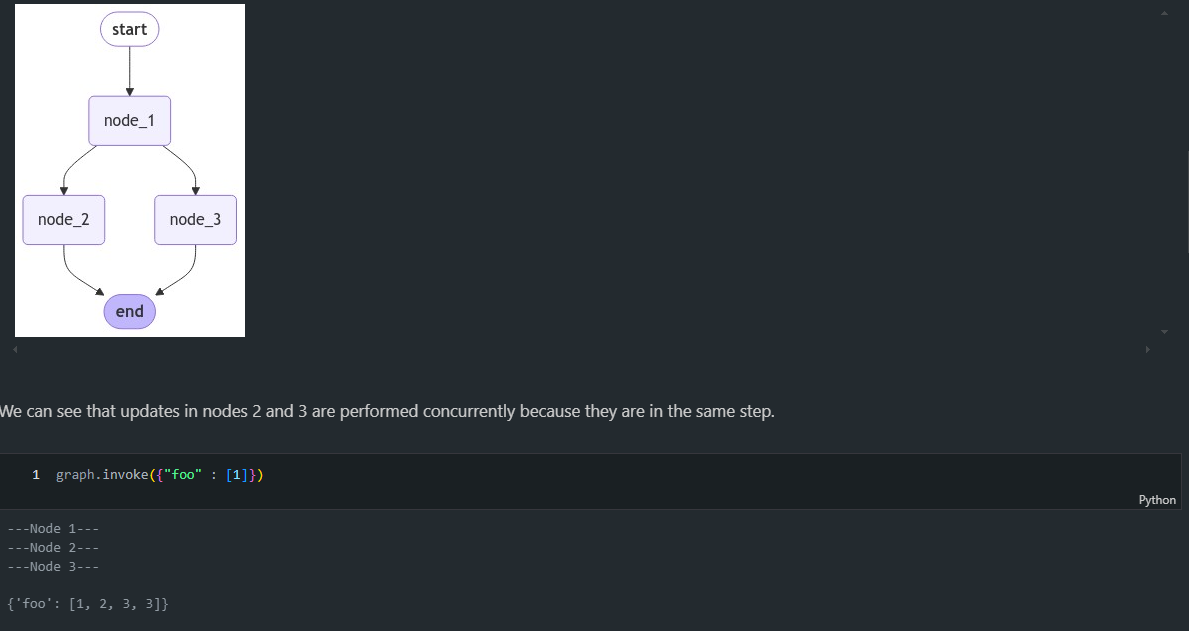
-
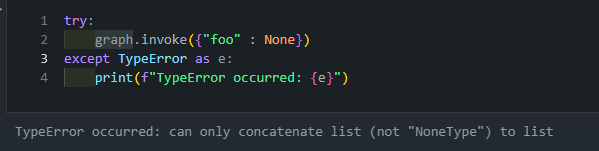
코드를 변경했더니 에러 없이 돌아가는 것을 확인할 수 있습니다. 하지만 그래프의 노드들이 None 값을 처리하도록 설계되지 않았다면, TypeError가 발생할 가능성이 높습니다.
-
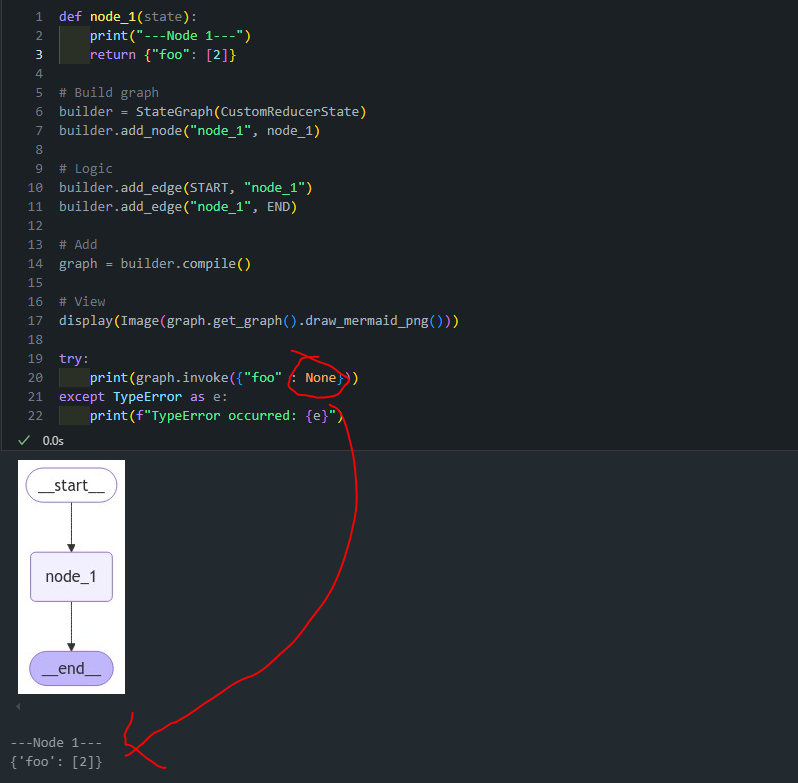
이때 사용되는 것이 바로 커스텀 Reducer 함수입니다.
- 이 reduce_list 함수는 사용자 정의 리듀서(custom reducer)로, 두 리스트를 안전하게 결합하는 역할을 합니다.
- 이 함수의 주요 특징과 None 처리 방식은 다음과 같습니다:
- 두 개의 리스트를 입력받아 하나의 리스트로 결합합니다.
- None 값을 포함한 다양한 입력 상황을 안전하게 처리합니다.
- 이 함수의 주요 특징과 None 처리 방식은 다음과 같습니다:
1
2
3
4
5
6
7
8
9
10
11
12
13
14
15
16
17

def reduce_list(left: list | None, right: list | None) -> list:
    """Safely combine two lists, handling cases where either or both inputs might be None.

    Args:
        left (list | None): The first list to combine, or None.
        right (list | None): The second list to combine, or None.

    Returns:
        list: A new list containing all elements from both input lists.
               If an input is None, it's treated as an empty list.
    """
    if not left:
        left = []
    if not right:
        right = []
    return left + right
-
위와 같이 구현함으로써 None이 들어와도 정상적으로 값을 반환하는 것을 확인할 수 있습니다.
SUMMARY
- 기본 Reducer: 상태를 덮어쓰는 방식입니다. 예를 들어, 그래프의 두 노드가 동일한 키를 동시에 업데이트하면, 마지막 업데이트된 값이 최종 값으로 저장됩니다.
- 커스텀 Reducer: 상태를 덮어쓰지 않고 값을 병합하거나 리스트에 추가하는 방식으로 동작합니다. 예를 들어, 키가 리스트로 정의된 경우 Reducer를 사용해 새로운 값을 리스트에 추가할 수 있습니다.
에러 처리: 상태 업데이트 시 값이 None과 같은 유효하지 않은 값이 입력될 수 있습니다. 이를 방지하기 위해 커스텀 Reducer를 정의하여 이러한 경우에도 안전하게 값을 처리할 수 있습니다.
Messages
-
CustomMessagesState: TypedDict를 상속받아 커스텀 딕셔너리 타입을 정의합니다.messages 키를 명시적으로 정의하고, Annotated를 사용하여 add_messages 리듀서를 연결합니다.
- 추가적인 키들(added_key_1, added_key_2 등)을 직접 정의합니다.
-
ExtendedMessagesState: MessagesState를 상속받습니다. 이 클래스는 이미 messages 키와 add_messages 리듀서가 구현되어 있습니다.- 추가적인 키들(added_key_1, added_key_2 등)만 정의합니다.
1
2
3
4
5
6
7
8
9
10
11
12
13
14
15
16
17
18
19

from typing import Annotated
from langgraph.graph import MessagesState
from langchain_core.messages import AnyMessage
from langgraph.graph.message import add_messages

# Define a custom TypedDict that includes a list of messages with add_messages reducer
class CustomMessagesState(TypedDict):
    messages: Annotated[list[AnyMessage], add_messages]
    added_key_1: str
    added_key_2: str
    # etc

# Use MessagesState, which includes the messages key with add_messages reducer
class ExtendedMessagesState(MessagesState):
    # Add any keys needed beyond messages, which is pre-built
    added_key_1: str
    added_key_2: str
    # etc
MessagesState은 내장된messageskey가 있는 것을 확인할 수 있습니다.CustomMessagesState는 별도로messageskey를 정의해줘야 합니다.
LangGraph에서는 메시지를 효과적으로 처리/관리하는 방법
LangGraph에서는 메시지를 효과적으로 처리/관리하기 위한
두 가지 주요 방법을 제공합니다.
add_messages 리듀서: add_messages 리듀서는 상태의 messages 키에 새 메시지를 추가하는 기능을 합니다. 이를 사용하면 메시지 목록을 쉽게 업데이트할 수 있습니다.MessagesState 클래스: MessagesState는 messages 키와 add_messages 리듀서가 미리 구현된 편리한 클래스입니다. 이를 상속하여 추가 키를 포함하는 커스텀 상태 클래스를 쉽게 만들 수 있습니다.
add_messages 리듀서의 다양한 기능
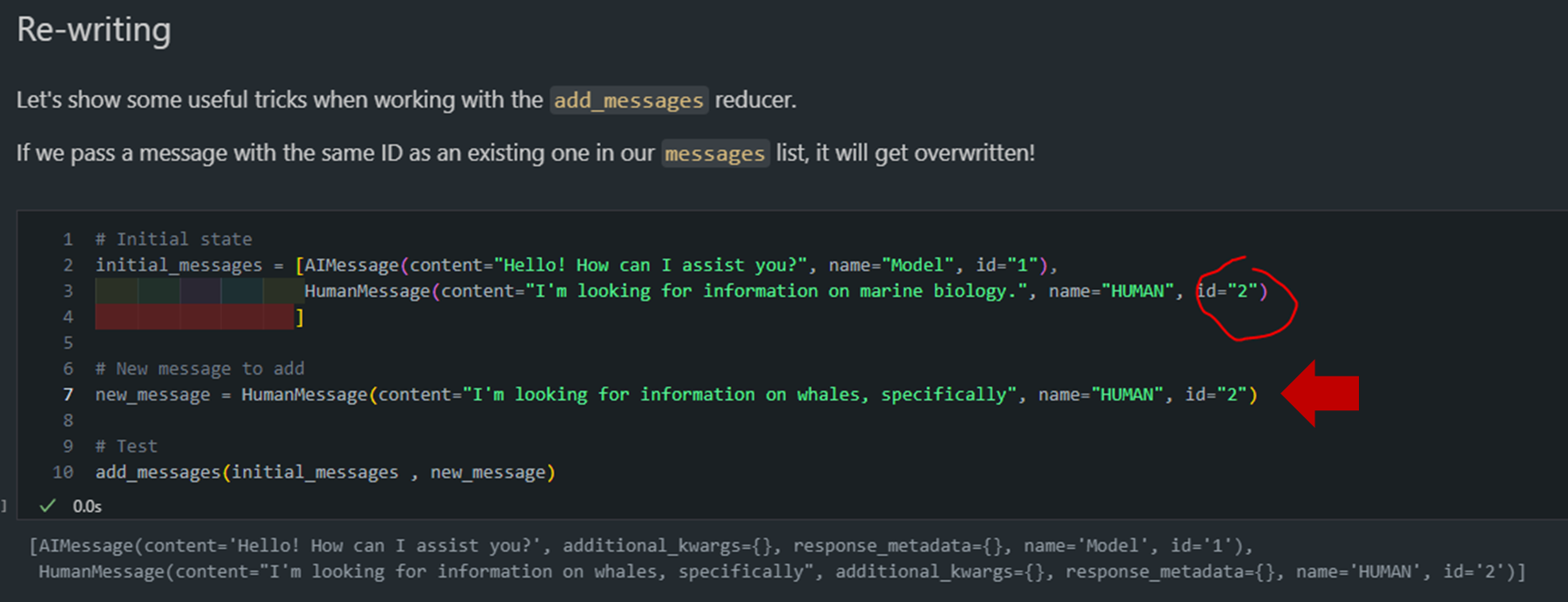
- 메시지 덮어쓰기 기능
- 동일한 ID를 가진 메시지를 추가하면 기존 메시지를 덮어씁니다.
- 이를 통해 특정 메시지를 업데이트할 수 있습니다.
# Initial state initial_messages = [AIMessage(content="Hello! How can I assist you?", name="Model", id="1"), HumanMessage(content="I'm looking for information on marine biology.", name="HUMAN", id="2") ] # New message to add new_message = HumanMessage(content="I'm looking for information on whales, specifically", name="HUMAN", id="2") # Test add_messages(initial_messages , new_message)
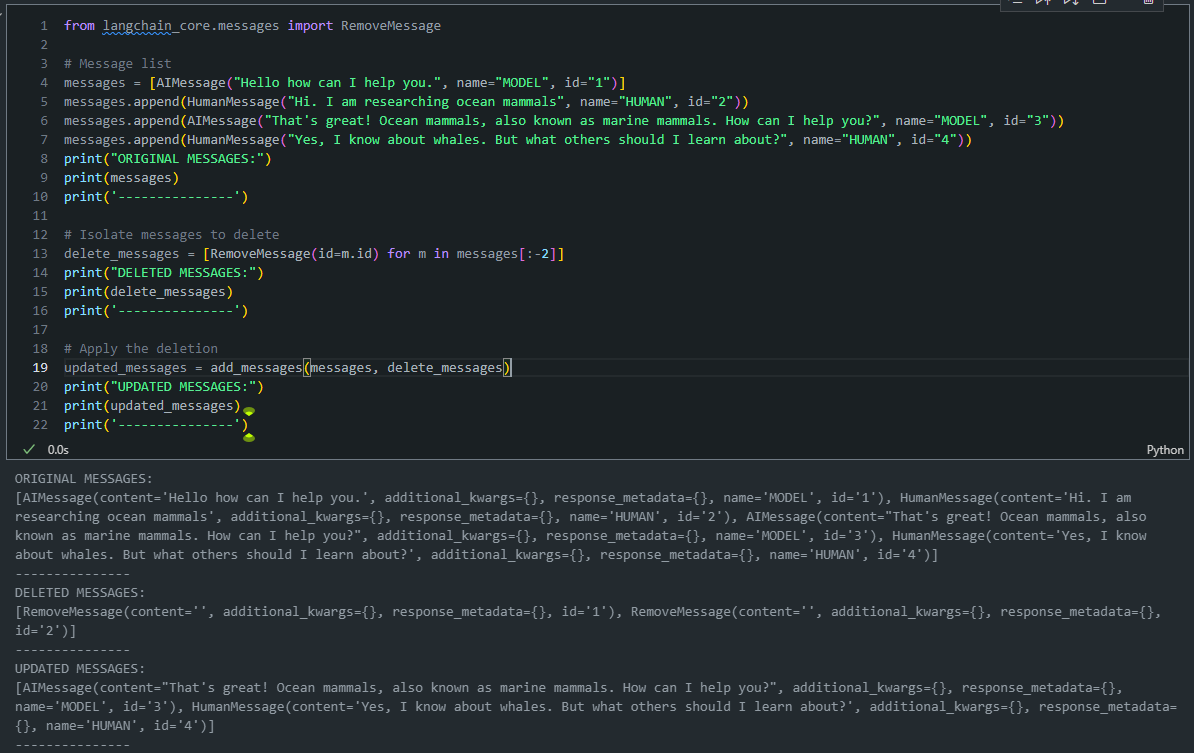
- 메시지 제거 기능
- RemoveMessage 객체를 사용하여 특정 ID의 메시지를 제거할 수 있습니다1
- 이 기능은 더 이상 필요하지 않은 메시지를 상태에서 제거할 때 유용합니다.
# Message list messages = [AIMessage("Hello how can I help you.", name="MODEL", id="1")] messages.append(HumanMessage("Hi. I am researching ocean mammals", name="HUMAN", id="2")) messages.append(AIMessage("That's great! Ocean mammals, also known as marine mammals. How can I help you?", name="MODEL", id="3")) messages.append(HumanMessage("Yes, I know about whales. But what others should I learn about?", name="HUMAN", id="4")) print("ORIGINAL MESSAGES:") print(messages) print('---------------') # Isolate messages to delete delete_messages = [RemoveMessage(id=m.id) for m in messages[:-2]] print("DELETED MESSAGES:") print(delete_messages) print('---------------') # Apply the deletion updated_messages = add_messages(messages, delete_messages) print("UPDATED MESSAGES:") print(updated_messages) print('---------------')
Lesson 3: Multiple Schemas
-
Langraph에서 그래프의 노드 간에는 여러 스키마를 사용할 수 있습니다.
- 이는
입력(Input)스키마와출력(Output)스키마를 구분하여 그래프 내에서 각기 다른 형식으로 데이터를 처리할 수 있게 합니다. - 이러한 다중 스키마 접근 방식은 복잡한 워크플로우를 더 효과적으로 관리하고, 데이터의 흐름을 정밀하게 제어할 수 있게 해줍니다.
- 이는
-
주요 스키마 유형:InputState (입력 스키마): 그래프에 전달되는 초기 데이터 구조를 정의합니다.OutputState (출력 스키마): 그래프가 최종적으로 반환하는 데이터 구조를 정의합니다.OverallState (전체 상태 스키마): 그래프 내부에서 사용되는 모든 데이터를 포함하는 포괄적인 스키마입니다.PrivateState (비공개 상태 스키마): 특정 노드 간에만 공유되는 임시 또는 중간 데이터를 정의합니다.User-defined schema (사용자 정의 스키마): 사용자가 특정 요구사항에 맞춰 직접 정의하는 스키마입니다
🤖 (추가) 예를 들어, 고객 서비스 챗봇을 만든다고 가정해 보겠습니다.
🤖 이 챗봇은 고객의 질문을 받아 적절한 답변을 제공하고, 필요한 경우 내부 데이터베이스를 검색합니다. 이 경우 다음과 같은 여러 스키마를 사용할 수 있습니다:
-
InputState (입력 스키마): 그래프에 전달되는 초기 데이터 구조를 정의
1 2 3
class InputState(TypedDict): customer_query: str customer_id: str -
OutputState (출력 스키마): 그래프가 최종적으로 반환하는 데이터 구조를 정의
1 2 3
class OutputState(TypedDict): response: str satisfaction_score: int -
OverallState (전체 상태 스키마): 그래프 내부에서 사용되는 모든 데이터를 포함하는 포괄적인 스키마
1 2 3 4 5 6 7
class OverallState(TypedDict): customer_query: str customer_id: str response: str satisfaction_score: int internal_notes: str database_results: dict -
PrivateState (비공개 상태 스키마): 특정 노드 간에만 공유되는 임시 또는 중간 데이터를 정의
1 2 3
class PrivateState(TypedDict): sentiment_analysis: str priority_level: int -
이제 이 스키마들을 사용하는 그래프를 구성해 보겠습니다:
1
2
3
4
5
6
7
8
9
10
11
12
13
14
15
16
17
18
19
20
21
22
23
24
25
26
from langgraph.graph import StateGraph, START, END

def query_analyzer(state: InputState) -> PrivateState:
    # 고객 질문 분석
    return {"sentiment_analysis": "positive", "priority_level": 2}

def database_searcher(state: OverallState) -> OverallState:
    # 데이터베이스 검색
    return {"database_results": {"product_info": "..."}}

def response_generator(state: OverallState) -> OutputState:
    # 응답 생성
    return {"response": "Here's the information you requested...", "satisfaction_score": 8}

graph = StateGraph(OverallState, input=InputState, output=OutputState)

graph.add_node("query_analyzer", query_analyzer)
graph.add_node("database_searcher", database_searcher)
graph.add_node("response_generator", response_generator)

graph.add_edge(START, "query_analyzer")
graph.add_edge("query_analyzer", "database_searcher")
graph.add_edge("database_searcher", "response_generator")
graph.add_edge("response_generator", END)

compiled_graph = graph.compile()
이 예시에서:
- 그래프는
InputState로 시작하여 고객의 질문을 받습니다. query_analyzer노드는PrivateState를 생성하여 내부적으로 사용합니다.database_searcher와response_generator노드는OverallState를 사용하여 작업합니다.- 최종적으로 그래프는
OutputState를 반환하여 고객에게 응답을 제공합니다.
이렇게 함으로써:
- 입력과 출력을 명확히 제한할 수 있습니다.
- 내부 작업에 필요한 추가 데이터를 관리할 수 있습니다.
- 특정 노드 간에만 공유되는 비공개 데이터를 처리할 수 있습니다.
이 구조를 통해 복잡한 워크플로우를 관리하면서도 각 단계에서 필요한 정보만을 노출하고 처리할 수 있습니다.
각각의 State별로 상세하게 살펴보도록 하겠습니다:
PrivateState 예시
- OverallState (전체 상태 스키마): 그래프 내부에서 사용되는 모든 데이터를 포함하는 포괄적인 데이터 구조를 정의합니다.
- PrivateState (비공개 상태 스키마): 특정 노드 간에만 공유되는 임시 또는 중간 데이터를 정의합니다.
- 특정 노드 간에만 공유되는 임시 또는 중간 데이터를 정의할때 사용합니다.
- 아래 코드에서는 중간에 있는 Private 노드에서 사용된 State는 외부로 드러나지 않는 것을 확인할 수 있습니다.
1
2
3
4
5
6
7
8
9
10
11
12
13
14
15
16
17
18
19
20
21
22
23
24
25
26
27
28
29
30
31
32
33
from typing_extensions import TypedDict
from IPython.display import Image, display
from langgraph.graph import StateGraph, START, END

class OverallState(TypedDict):
    foo: int

class PrivateState(TypedDict):
    baz: int

def node_1(state: OverallState) -> PrivateState:
    print("---Node 1---")
    return {"baz": state['foo'] + 1}

def node_2(state: PrivateState) -> OverallState:
    print("---Node 2---")
    return {"foo": state['baz'] + 1}

# Build graph
builder = StateGraph(OverallState)
builder.add_node("node_1", node_1)
builder.add_node("node_2", node_2)

# Logic
builder.add_edge(START, "node_1")
builder.add_edge("node_1", "node_2")
builder.add_edge("node_2", END)

# Add
graph = builder.compile()

# View
display(Image(graph.get_graph().draw_mermaid_png()))
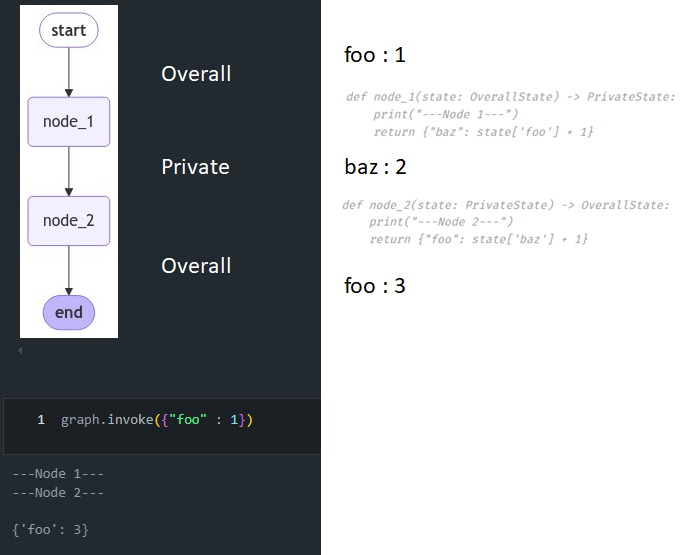
bazis only included inPrivateState.node_2usesPrivateStateas input, but writes out toOverallState.
Input / Output Schema
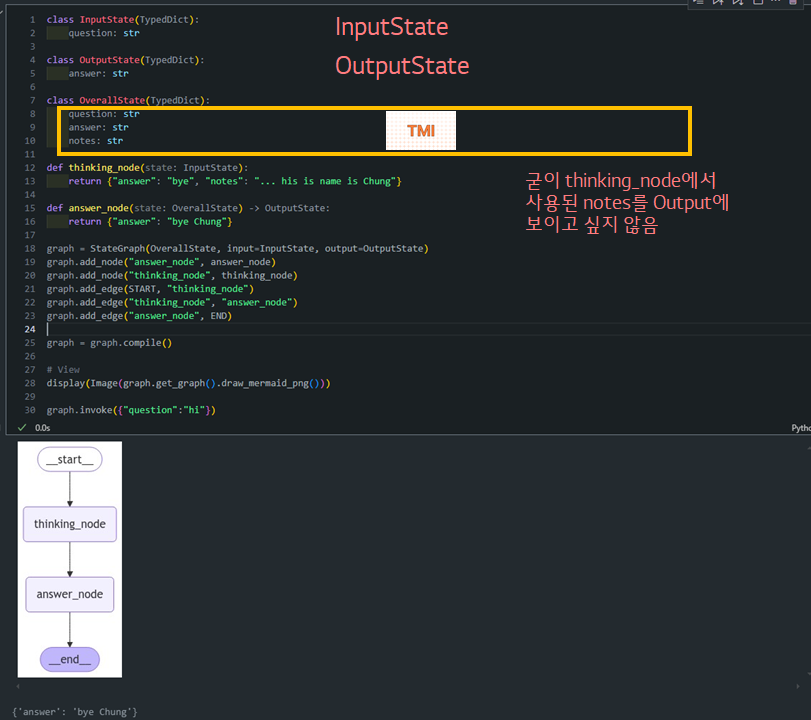
- InputState (입력 스키마, 질문만 포함): 그래프에 전달되는 초기 데이터 구조를 정의합니다.
- OutputState (출력 스키마, 답변만 포함): 그래프가 최종적으로 반환하는 데이터 구조를 정의합니다.
- OverallState (전체 상태 스키마, 질문/답변/노트를 모두 포함): 그래프 내부에서 사용되는 모든 데이터를 포함하는 포괄적인 데이터 구조를 정의합니다.
1
2
3
4
5
6
7
8
9
10
11
12
13
14
15
16
17
18
19
20
21
22
23
24
25
26
27
28
29
30
class InputState(TypedDict):
    question: str

class OutputState(TypedDict):
    answer: str

class OverallState(TypedDict):
    question: str
    answer: str
    notes: str

def thinking_node(state: InputState):
    return {"answer": "bye", "notes": "... his is name is Chung"}

def answer_node(state: OverallState) -> OutputState:
    return {"answer": "bye Chung"}

graph = StateGraph(OverallState, input=InputState, output=OutputState)
graph.add_node("answer_node", answer_node)
graph.add_node("thinking_node", thinking_node)
graph.add_edge(START, "thinking_node")
graph.add_edge("thinking_node", "answer_node")
graph.add_edge("answer_node", END)

graph = graph.compile()

# View
display(Image(graph.get_graph().draw_mermaid_png()))

graph.invoke({"question":"hi"})
Lesson 4: Trim and Filter Messages
-
복습:
-
from langchain_core.messages import AIMessage, HumanMessage: 우리는 Langchain의 Messages 기능을 사용하여 AIMessage, HumanMessage를 정의하고 이를 LLM에 전달해줄 수 있습니다.1 2 3 4 5 6
from langchain_core.messages import AIMessage, HumanMessage messages = [AIMessage(f"당신이 해양 포유류를 연구하고 있다고 하셨나요?", name="AI")] messages.append(HumanMessage(f"네, 저는 고래에 대해 알고 있어요. 하지만 다른 어떤 동물에 대해 배워야 할까요?", name="HUMAN")) for m in messages: m.pretty_print()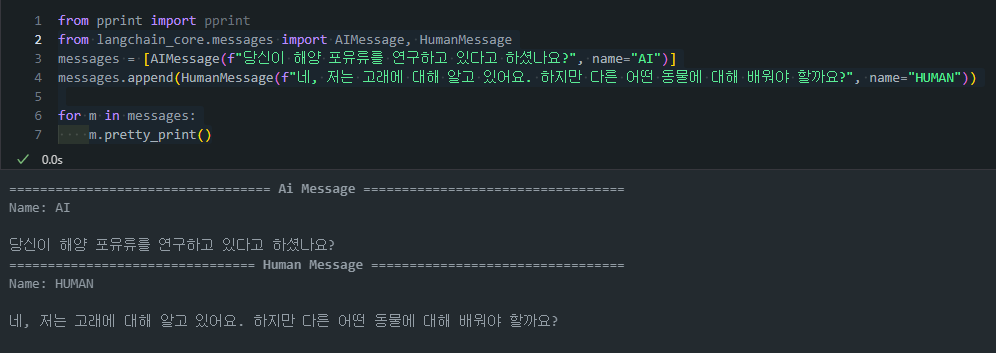
-
이전에 나눴던 대화들을 바탕으로 LLM이 답변을 하는 것을 확인할 수 있습니다.
1
2
3
4
5
6
from langchain_openai import ChatOpenAI
llm = ChatOpenAI(model="gpt-4o")
messages.append(llm.invoke(messages))

for m in messages:
    m.pretty_print()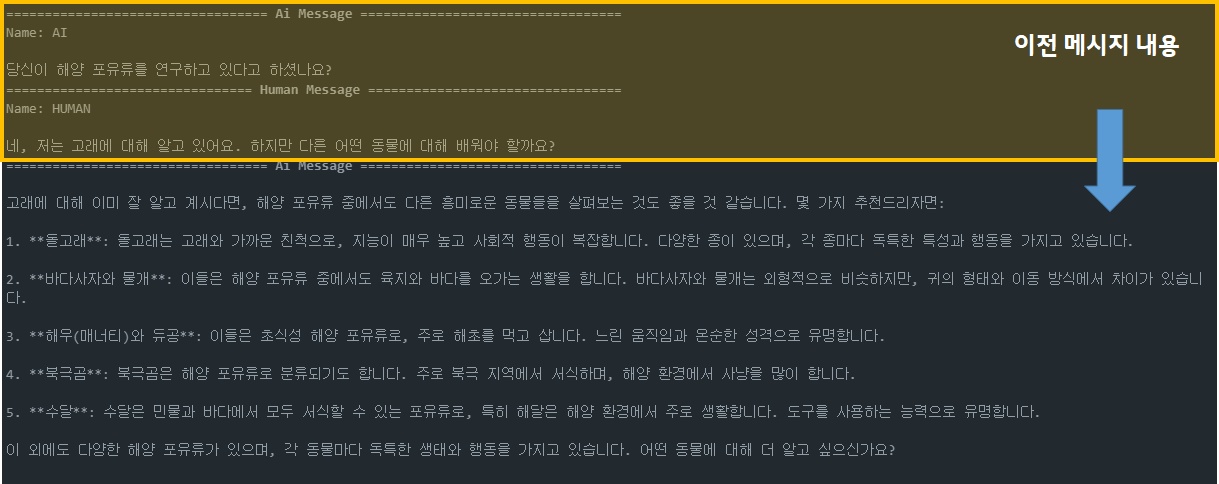
-
이러한 기능은
from langgraph.graph import MessagesState에 정의되어 있습니다.- ✨ 앞에서 다뤘던 것처럼
MessagesState에는 내장된 ‘messages’ 키가 존재합니다. 또한 이 키에는 내장된add_messages리듀서가 존재합니다.1 2 3 4
from typing import Annotated from langgraph.graph import MessagesState from langchain_core.messages import AnyMessage from langgraph.graph.message import add_messages
1
2
3
4
5
6
# add_messages 리듀서로 메시지 리스트를 포함하는 사용자 정의 TypedDict 정의
class CustomMessagesState(TypedDict):
  messages: Annotated[list[AnyMessage], add_messages]
  added_key_1: str
  added_key_2: str
  # 등
1
2
3
4
5
6
# MessagesState 사용, 이미 add_messages 리듀서가 있는 messages 키 포함
class ExtendedMessagesState(MessagesState):
  # messages 외에 필요한 키 추가, messages는 미리 구축되어 있음
  added_key_1: str
  added_key_2: str
  # etc
- ✨ 앞에서 다뤘던 것처럼
messages 키: AnyMessage 객체의 리스트를 저장합니다. (list[AnyMessage])AnyMessage는HumanMessage,AIMessage,SystemMessage등 다양한 메시지 타입을 포함할 수 있습니다add_messages리듀서가 기본으로 포함되어 있습니다. 이 리듀서는 새 메시지를 기존 메시지 리스트에 추가합니다.1 2 3 4 5 6 7 8 9 10 11 12 13 14 15 16 17
from IPython.display import Image, display from langgraph.graph import MessagesState from langgraph.graph import StateGraph, START, END # Node def chat_model_node(state: MessagesState): return {"messages": llm.invoke(state["messages"])} # Build graph builder = StateGraph(MessagesState) builder.add_node("chat_model", chat_model_node) builder.add_edge(START, "chat_model") builder.add_edge("chat_model", END) graph = builder.compile() # View display(Image(graph.get_graph().draw_mermaid_png()))(참고)
add_messages리듀서 Output 예시-
add_messages를 사용하면 그냥str으로 메세지를 전달해줘도HumanMessage로 전달되는 것을 확인할 수 있습니다. 반먄에 그냥append를 할 경우, 일반list append가 수행되는 것을 확인할 수 있습니다.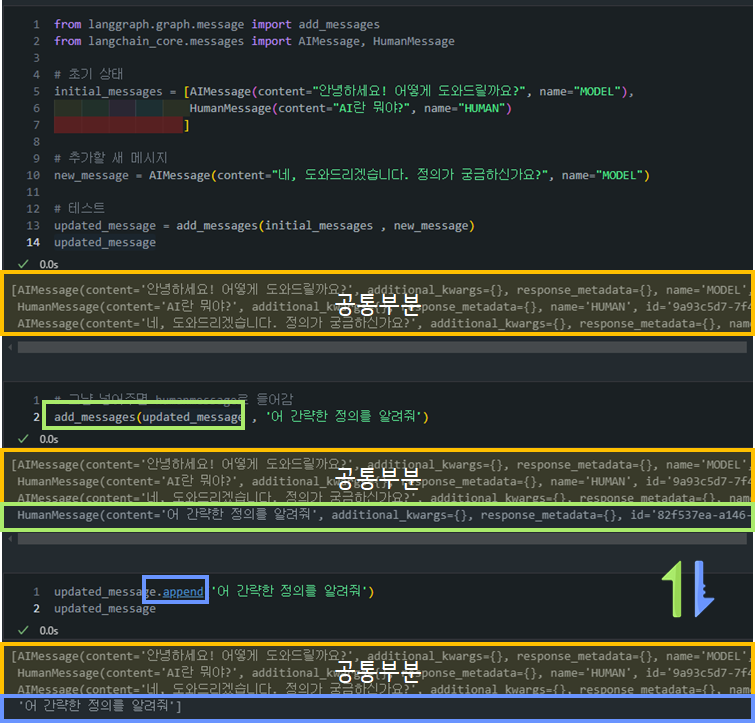
-
그렇다면 append로
HumanMessage나AIMessage를 넣어줄 수 있는 방법은 없을까요? 물론 있습니다!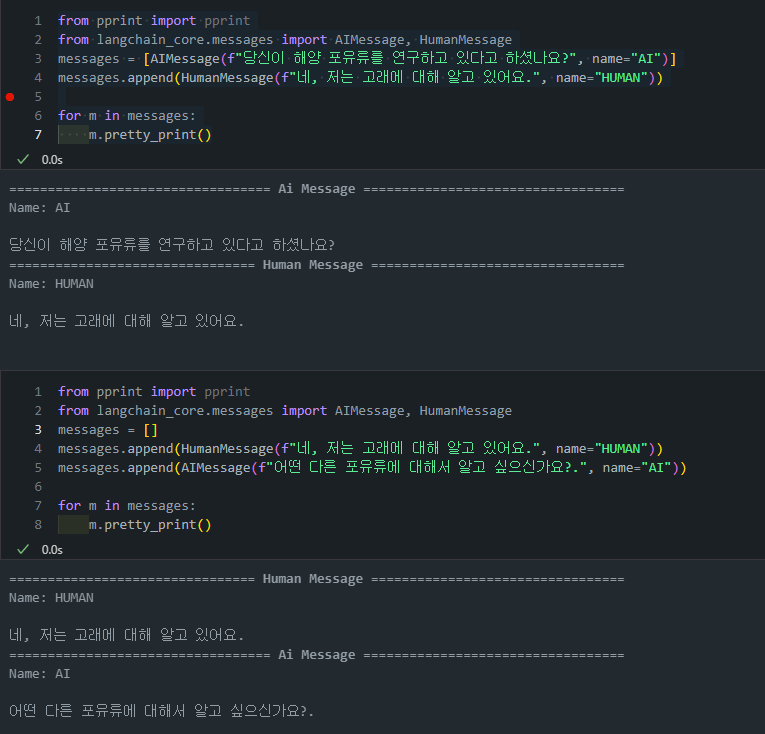
-
-
장기 대화에서 메시지 히스토리가 길어질 경우, 토큰 사용량이 급증할 수 있습니다.
-
이를 방지하기 위해 Langraph에서는 메시지 히스토리를 관리하는 아래와 같은 방법들을 제공합니다. 각 기법에 대해서 살펴보겠습니다.
-
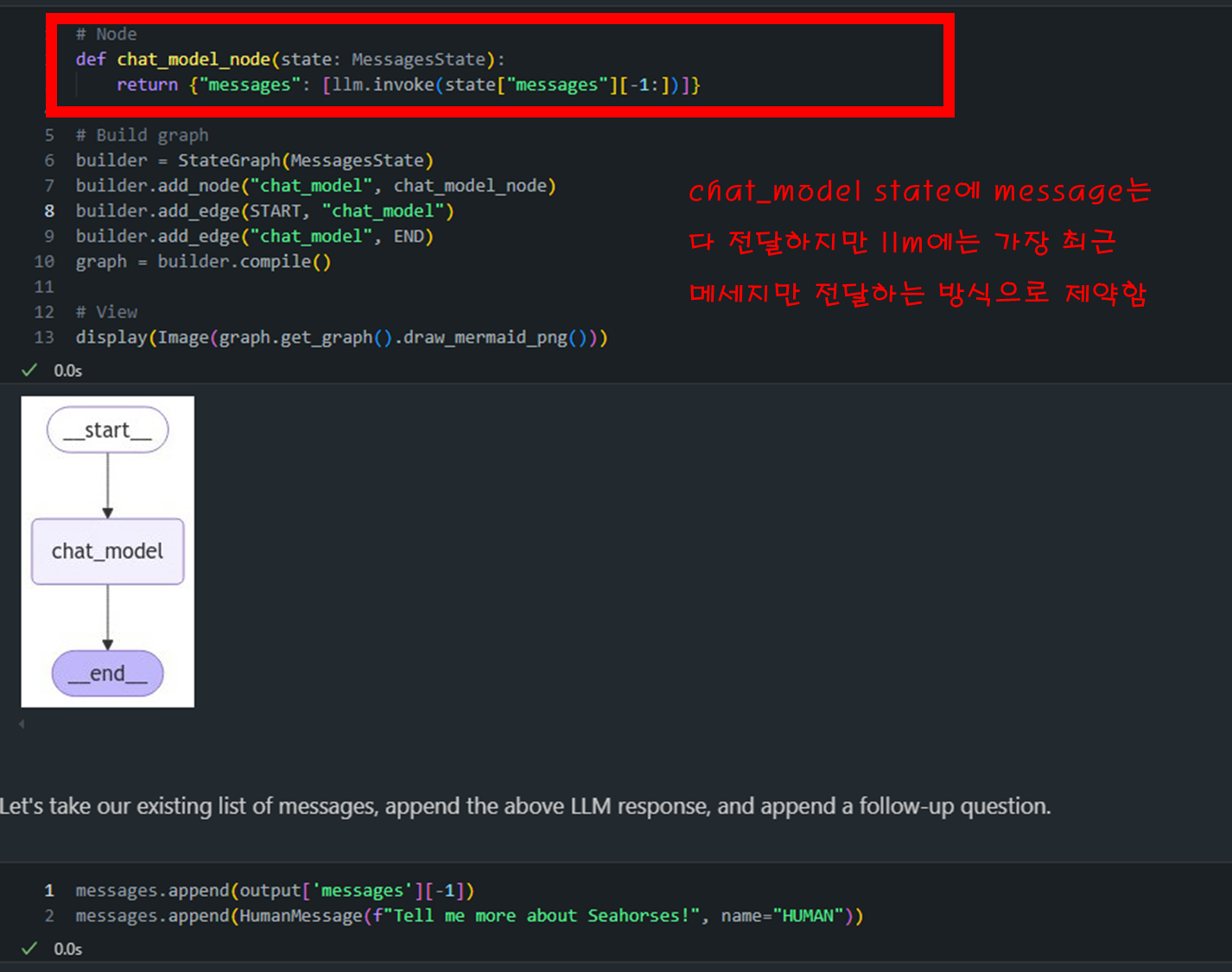
필터링: 메시지 히스토리에서 필요한 최근 메시지만 남기고 이전 메시지를 삭제하는 방식입니다.
- (복습) 이전 시간에 배운
remove_messages리듀서 함수는 특정 메시지 ID를 기준으로 메시지를 삭제하는 기능을 제공합니다. -> 이는 그래프 state에서도 해당 정보가 사라지게 됩니다 - 하지만 이번에 배울
필터링의 개념은 이와는 조금 다른 개념입니다. 왜냐하면 모델에 들어가게되는 정보는 한정적이지만, 그래프의 state에는 모든 정보가 들어가있을 것이기 때문입니다. ```
Node
def chat_model_node(state: MessagesState): return {“messages”: [llm.invoke(state[“messages”][-1:])]} ```
-
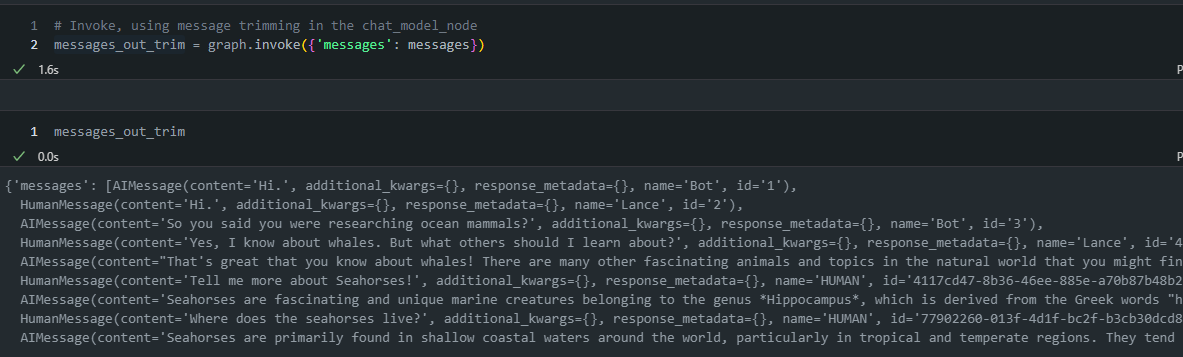
아래 그림 보면 message에는 모든 정보가 다 담겨 있는 것을 확인할 수 있습니다.
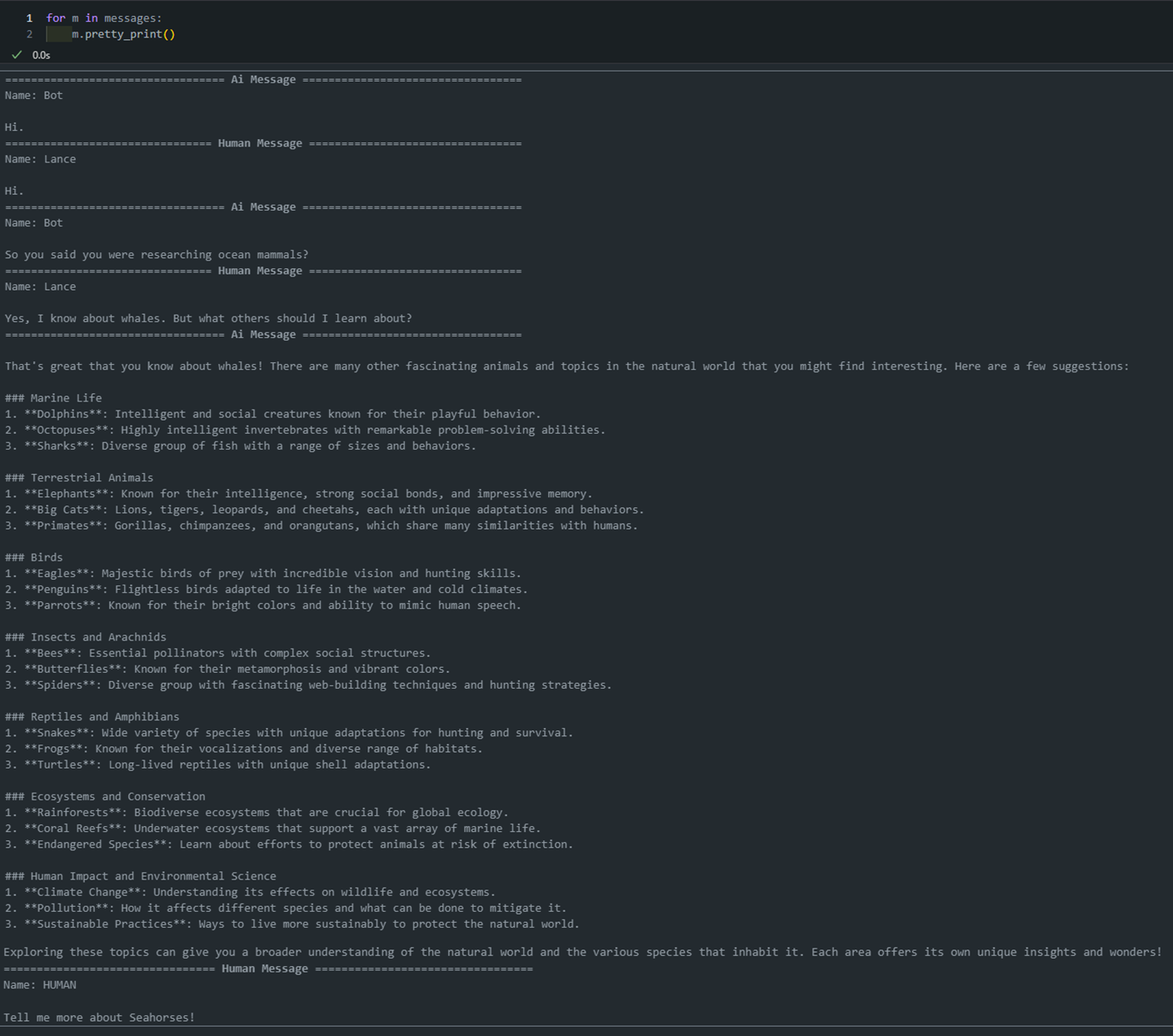
-
반대로 실제 llm에 넘어간 질의문은 “해마에 대해서 알려알려줘”라는 질문만이 넘어간 것을 볼 수 있습니다.
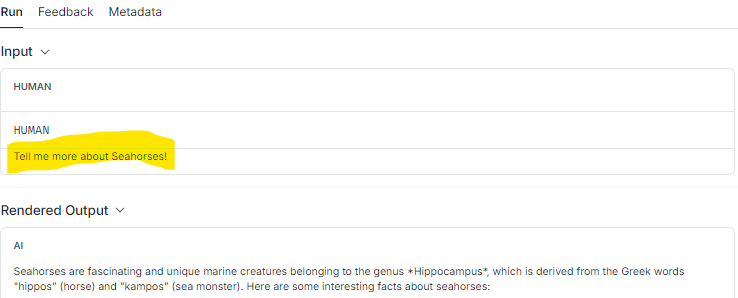
- (복습) 이전 시간에 배운
-
트리밍: 메시지를 토큰 수 기준으로 잘라내는 방법(
trim_messages)입니다. 위의필터링이 에이전트 간의 메시지의 사후 하위 집합만 반환하는 반면,트리밍은 채팅 모델이 응답하는 데 사용할 수 있는 토큰 수를 제한합니다.1 2 3 4 5 6 7 8 9 10 11 12 13
from langchain_core.messages import trim_messages # Node def chat_model_node(state: MessagesState): messages = trim_messages( state["messages"], max_tokens=100, strategy="last", token_counter=ChatOpenAI(model="gpt-4o"), allow_partial=False, ) return {"messages": [llm.invoke(messages)]}state["messages"]: 트리밍할 메시지 목록입니다.max_tokens=100: 결과 메시지의 최대 토큰 수를 100으로 제한합니다.strategy="last": 마지막 메시지부터 시작해 역순으로 메시지를 포함시킵니다.token_counter=ChatOpenAI(model="gpt-4"): 토큰 수를 계산하는 데 사용할 모델을 지정합니다.-
allow_partial=False: 메시지를 부분적으로 자르는 것을 허용하지 않습니다.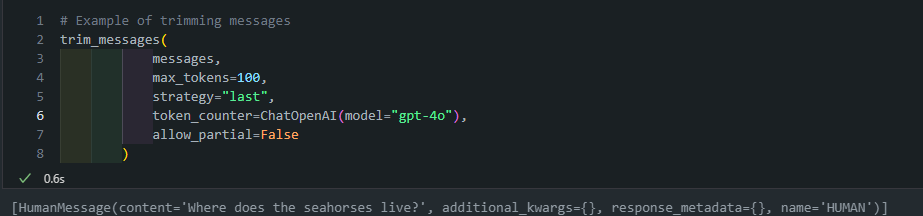
-
여기도 위와 마찬가지로 LLM 모델에 들어가는 것은 token 조건에 해당하는 질의문만 넘어가게 됩니다.
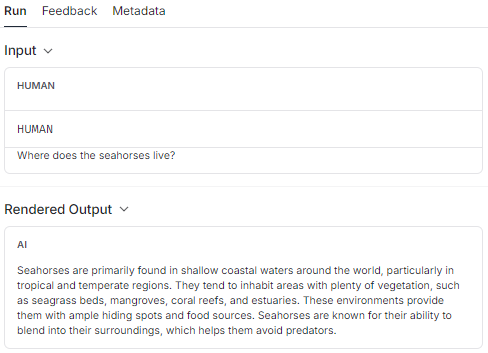
-
그리고 langraph 상에는 전체의 message history는 그대로 유지되게 됩니다.
-
Lesson 5: Chatbot w/ Summarizing Messages and Memory
이번 내용은 대화형 챗봇에서 대화를 요약하는 방법을 설명합니다. 요약 기능은 대화를 오래 유지하면서도 메시지의 전체 기록을 남기지 않고 대화를 압축하는 기술로, 앞에서 다룬 필터링이나 메시지 삭제보다 더 많은 정보를 보존하려는 시도입니다.
- 이 기능은 LLMs(Large Language Models)를 사용하여 대화의 주요 내용을 실시간으로 요약하는 방법을 설명합니다.
1. 기본 설정 및 메시지 상태 구성
message state에는 기본적으로 메시지 목록을 저장하는messages키가 있지만, 여기에 대화 요약을 저장할 수 있는 새로운summary키를 추가합니다.
1
2
3
from langgraph.graph import MessagesState
class State(MessagesState):
    summary: str
call model이라는 노드에서는 기존 요약이 있으면 메시지 목록에 추가하고 모델을 호출합니다.
1
2
3
4
5
6
7
8
9
10
11
12
13
14
15
16
17
18
19
20
21
22
from langchain_core.messages import SystemMessage, HumanMessage, RemoveMessage

# Define the logic to call the model
def call_model(state: State):

    # Get summary if it exists
    summary = state.get("summary", "")

    # If there is summary, then we add it
    if summary:

        # Add summary to system message
        system_message = f"Summary of conversation earlier: {summary}"

        # Append summary to any newer messages
        messages = [SystemMessage(content=system_message)] + state["messages"]

    else:
        messages = state["messages"]

    response = model.invoke(messages)
    return {"messages": response}
2. 요약 노드 구성
- 대화를 요약하는 summarize_conversation 노드를 추가하여 대화 상태를 받아 요약을 생성합니다.
- 만약 기존 요약이 있다면 이를 새로운 요약에 포함하여 업데이트합니다.
- 기존 요약이 없다면 새로 요약을 생성합니다.
- 요약을 생성한 후 상태를 필터링하기 위해
RemoveMessage를 사용하여 가장 최근 메시지 두 개만 남기고 나머지 메시지를 삭제합니다.
1
2
3
4
5
6
7
8
9
10
11
12
13
14
15
16
17
18
19
20
21
22
23
24
def summarize_conversation(state: State):

    # First, we get any existing summary
    summary = state.get("summary", "")

    # Create our summarization prompt
    if summary:

        # A summary already exists
        summary_message = (
            f"This is summary of the conversation to date: {summary}\n\n"
            "Extend the summary by taking into account the new messages above:"
        )

    else:
        summary_message = "Create a summary of the conversation above:"

    # Add prompt to our history
    messages = state["messages"] + [HumanMessage(content=summary_message)]
    response = model.invoke(messages)

    # Delete all but the 2 most recent messages
    delete_messages = [RemoveMessage(id=m.id) for m in state["messages"][:-2]]
    return {"summary": response.content, "messages": delete_messages}
3. 메시지 삭제와 요약 업데이트
- 대화 길이에 따라 요약을 생성할지 결정하는 조건부 엣지를 추가합니다.
len(messages) > 6: 길이가 6보다 길면 요약을 제공합니다.
1
2
3
4
5
6
7
8
9
10
11
12
13
14
from langgraph.graph import END
# Determine whether to end or summarize the conversation
def should_continue(state: State):

    """Return the next node to execute."""

    messages = state["messages"]

    # If there are more than six messages, then we summarize the conversation
    if len(messages) > 6:
        return "summarize_conversation"

    # Otherwise we can just end
    return END
4.체크포인터로 상태 유지
- 상태는 일시적이기 때문에 대화가 길어지면 상태를 보존하기 위해
MemorySaver의checkpointer 기능을 사용합니다. - 이 체크포인터는 메모리에 저장된 상태를 보존하며, 이를 통해 여러 번의 대화에서 상태를 유지할 수 있습니다.
- 요약 후 LLM에 대화를 요청하는 것이 아니라, 결과를 얻은 후 output에 산출하기 전에 누적된 대화가 많다면 요약을 수행하는 형태의 그래프
- memory 기능이 있어 다음 대화를 시작하는 단계에서 누적된 수에 따라 요약 여부 결정함
1
2
3
4
5
6
7
8
9
10
11
12
13
14
15
16
17
18
from IPython.display import Image, display
from langgraph.checkpoint.memory import MemorySaver
from langgraph.graph import StateGraph, START

# Define a new graph
workflow = StateGraph(State)
workflow.add_node("conversation", call_model)
workflow.add_node(summarize_conversation)

# Set the entrypoint as conversation
workflow.add_edge(START, "conversation")
workflow.add_conditional_edges("conversation", should_continue)
workflow.add_edge("summarize_conversation", END)

# Compile
memory = MemorySaver()
graph = workflow.compile(checkpointer=memory)
display(Image(graph.get_graph().draw_mermaid_png()))
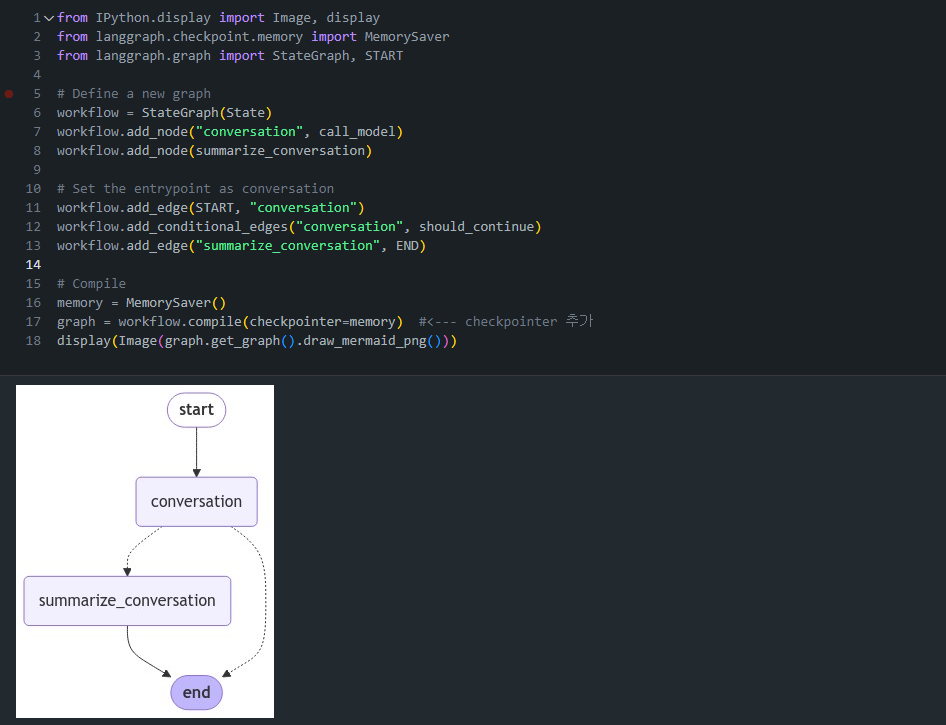
Threads
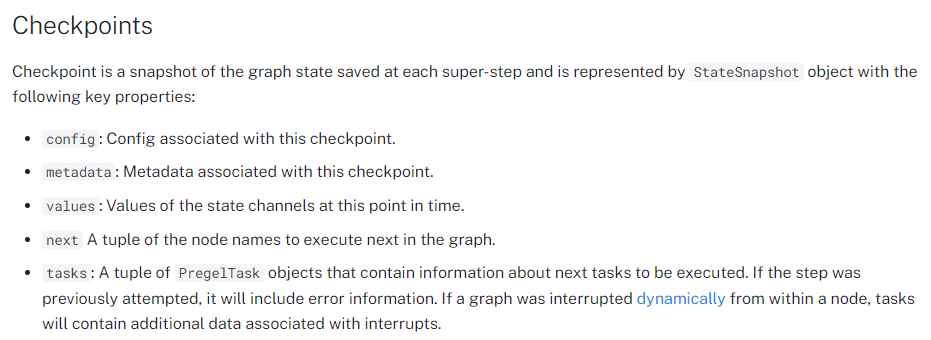
체크포인터는 각 단계에서 상태를 체크포인트로 저장합니다. 이렇게 저장된 체크포인트는 대화의 스레드로 그룹화될 수 있습니다.
예시: ChatGPT에서 사용자와 AI 사이의 대화는 스레드로 구성됩니다. 각 스레드는 하나의 주제나 대화 흐름을 나타냅니다.-
스레드의 특징:- 각 메시지는 스레드 내의 체크포인트와 같습니다.
- 새로운 대화를 시작하면 새 스레드가 생성됩니다.
- 하나의 스레드 안에서 대화의 맥락이 유지됩니다.
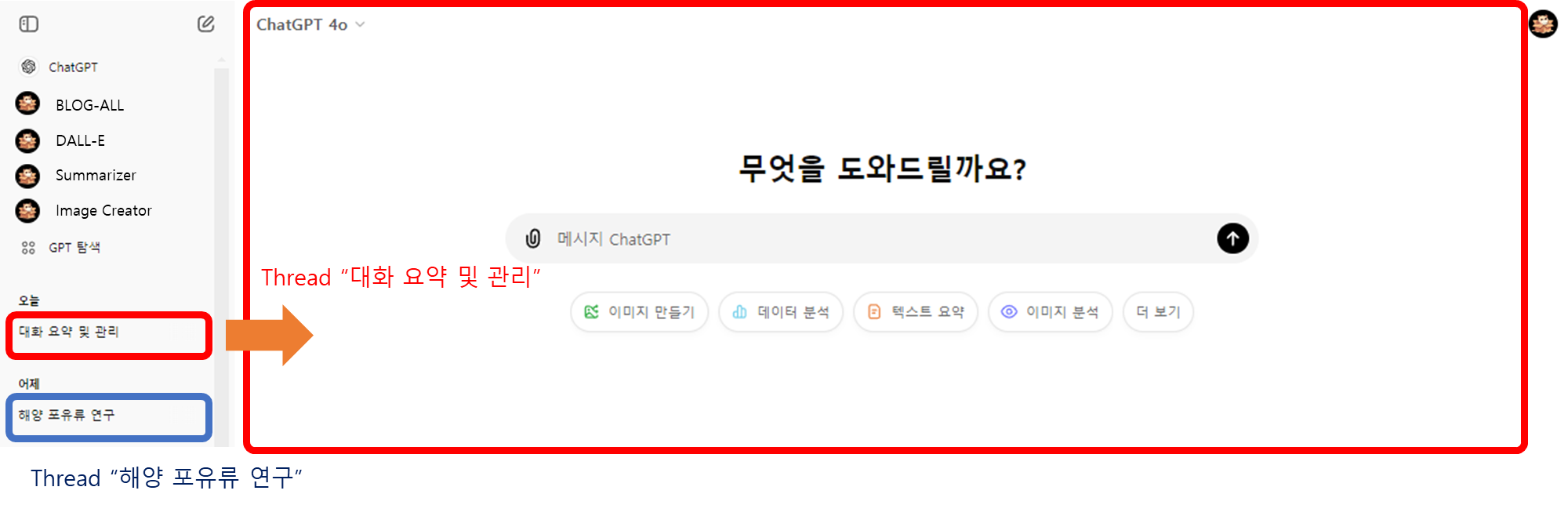
- ChatGPT 인터페이스에서는 왼쪽 사이드바에 각 스레드가 표시됩니다. 사용자는 이를 통해:
- 이전 대화 스레드로 쉽게 돌아갈 수 있습니다.
- 여러 주제의 대화를 동시에 관리할 수 있습니다.
- 특정 대화 내용을 빠르게 찾을 수 있습니다.
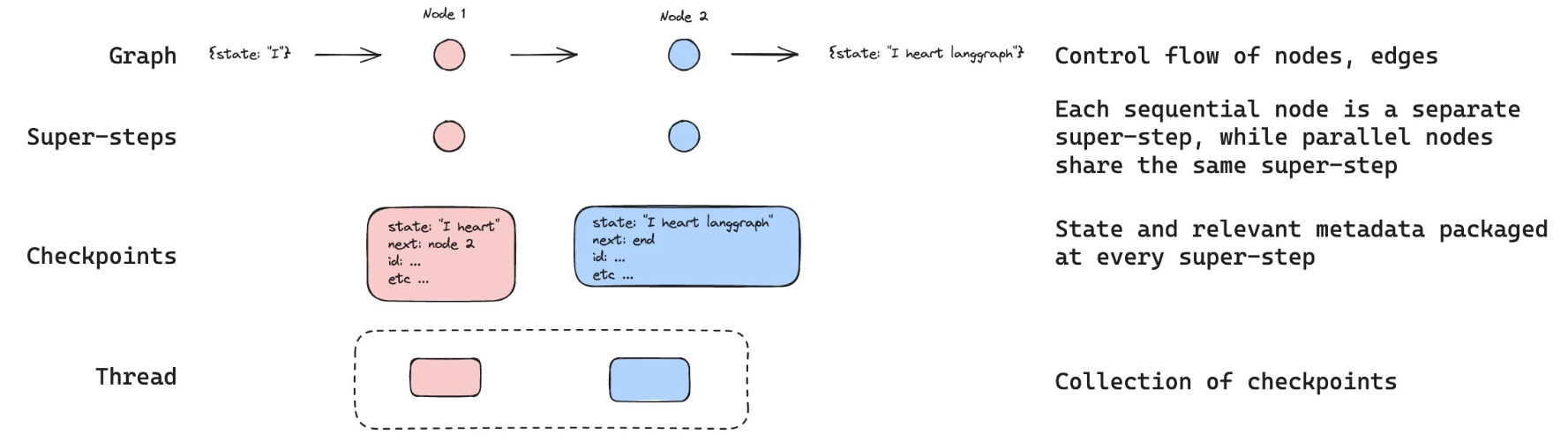
Langraph에서는 이와 비슷한 개념으로 configurable을 사용하여 스레드 ID를 설정합니다.
아래 그림과 같이 config = {"configurable": {"thread_id": "1"}} 선언 후 invoke 시에 config으로 넣어주게 되면 따로따로 실행해도 message에 기록이 제대로 남고 있는 것을 확인할 수 있습니다.
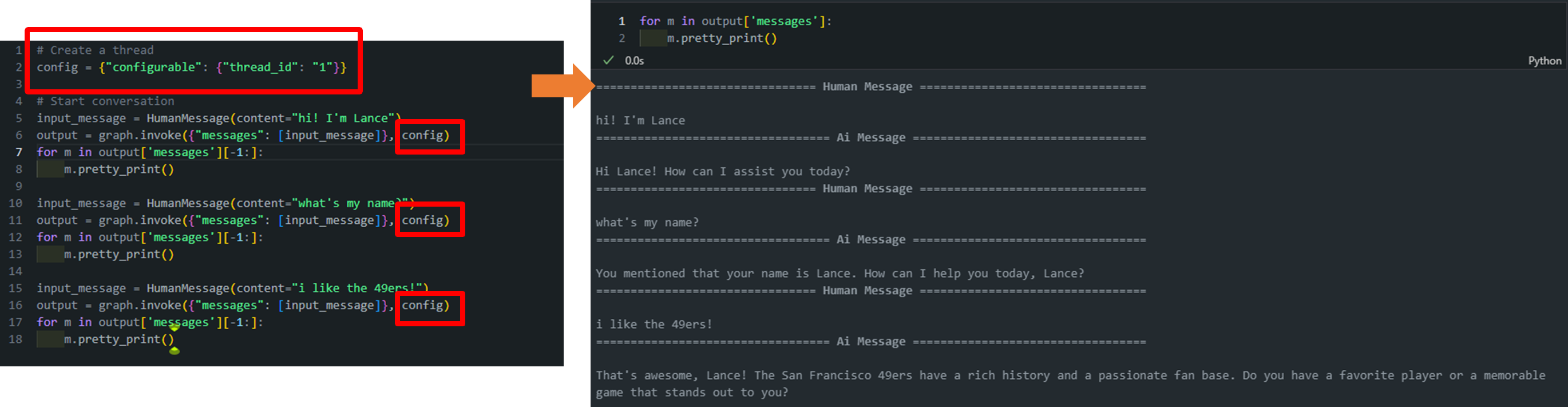
아직까지 6개의 대화가 넘지 않았기 때문에 요약(summary)가 수행되지 않은 것을 볼 수 있습니다.
- 하지만 하나의 대화를 추가함으로써 6개가 넘어서 요약이 발생하고
should_continue=>summarize_conversation이 발생하고, 가장 최근 2개의 대화만이 남는 것을 확인할 수 있습니다.
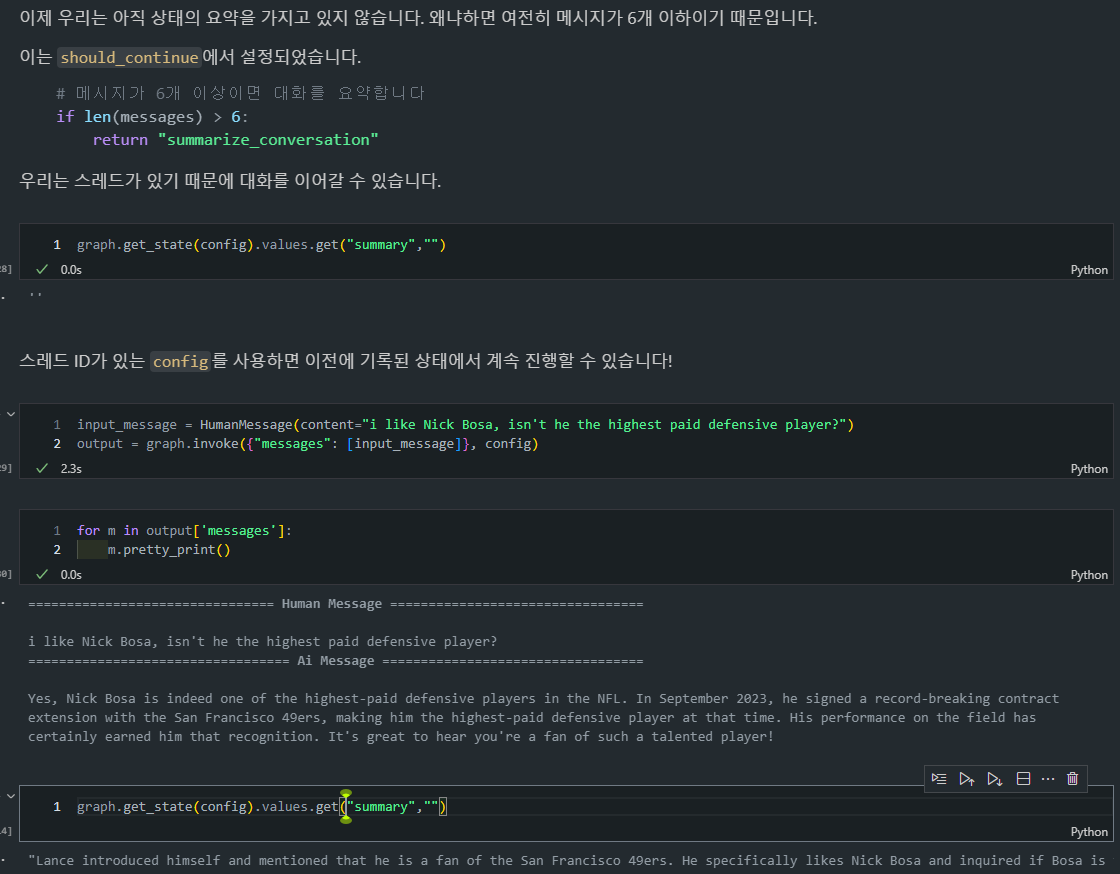
- 또한, 이전과는 다르게 Summary도 생성이 되어있는 것을 확인할 수 있습니다.
💡 (SUMMARY) 위에 정의한 구조는 다음과 같이 작동합니다:
- 요약이 생성되면 State 객체의 summary 필드에 저장됩니다.
- 새로운 사용자 메시지가 들어오면
call_model함수가 호출됩니다.call_model함수 내에서:
- 저장된 요약이 있는지 확인합니다.
- 요약이 있다면, 이를 시스템 메시지로 변환합니다.
- 이 시스템 메시지를 대화 히스토리의 맨 앞에 추가합니다.
- 그 다음에 새로운 사용자 메시지를 포함한 최근 메시지들이 추가됩니다.
- 이렇게 구성된 메시지 리스트(요약 + 최근 메시지들)가 LLM에 전달됩니다.
Lesson 6: Chatbot w/ Summarizing Messages and External Memory
Langraph는 외부 데이터베이스와의 연동을 통해 더 영속적인 메모리 저장 기능을 제공합니다.
- SQL Lite 사용: Langraph는 SQL Lite와 같은 외부 데이터베이스를 지원하여 메모리를 영구적으로 저장할 수 있습니다. 이 방식은 장기 대화를 지속적으로 유지하고 관리할 수 있는 환경을 제공합니다.

📊 SQLite (https://www.sqlite.org/)
- SQLite는 가볍고 설정이 필요 없는 서버리스 RDBMS로, 다양한 환경에서 손쉽게 사용할 수 있습니다.
- Python에서는 sqlite3 모듈을 통해 데이터베이스 연결부터 쿼리 실행까지 간단하게 구현할 수 있습니다.
- 전체 데이터가 하나의 파일에 저장되어 관리와 배포가 용이합니다.
- 트랜잭션 관리와 SQL 표준 지원으로 안정적인 데이터 처리가 가능합니다.
-
LangChain에서의 SqliteSaver 체크포인터: 언급된 SqliteSaver 체크포인터는 LangChain에서 제공하는
체크포인트 저장 방식중 하나로, 대화나 상태를 SQLite 데이터베이스에 저장하는 방식입니다. 이를 통해 대화의 상태나 진행 상황을 메모리나 파일에 저장하여 복구할 수 있습니다.-
체크포인터 역할: 시스템이 중단되거나 대화가 길어졌을 때, 상태를 보존하거나 관리할 수 있도록 돕습니다. SQLite는 이러한 체크포인터로 적합한 경량형 데이터베이스입니다. 메모리를 SQL Lite에 저장함으로써 세션이 종료되더라도 대화 기록을 유지할 수 있습니다. 새로운 세션이 시작되더라도 이전 대화를 불러와 이어서 진행할 수 있습니다.
-
메모리 내 SQLite 데이터베이스
1 2 3 4
import sqlite3 # In-memory database conn = sqlite3.connect(":memory:", check_same_thread=False):memory:: SQLite는"memory"문자열을 제공하면, 메모리 내에서 데이터베이스를 생성합니다. 이는 데이터베이스가 휘발성 메모리(RAM)에서 동작하며, 애플리케이션이 종료되거나 연결이 끊어지면 데이터가 사라집니다. 따라서 테스트, 임시 데이터 처리, 빠른 연산이 필요한 상황에서 매우 유용합니다.check_same_thread=False: SQLite는 기본적으로 멀티스레드에서의 동시 작업을 허용하지 않지만, 이 옵션을 설정하면 다중 스레드 환경에서도 하나의 연결을 공유할 수 있습니다.
-
로컬 SQLite 데이터베이스 저장
1
2
3
4

# 로컬 db에 저장
db_path = "state_db/example.db"
conn = sqlite3.connect(db_path, check_same_thread=False)
- 로컬 파일 기반 SQLite: 위 예시에서는
db_path = "state_db/example.db"와 같이, 로컬 파일에 데이터베이스를 저장하는 방식을 보여줍니다. SQLite는 파일 기반 데이터베이스로, 하나의 파일에 모든 데이터를 저장합니다. 이 파일은 다른 환경으로 쉽게 이동하거나 백업할 수 있습니다.
- 로컬 파일 기반 SQLite: 위 예시에서는
-
-
SQLite 데이터베이스 설정 및 체크포인터 생성:
1
2
3

from langgraph.checkpoint.sqlite import SqliteSaver
memory = SqliteSaver(conn)
SqliteSaver를 사용하여 SQLite 데이터베이스를 체크포인터로 설정합니다. 이를 통해 대화 상태가 데이터베이스에 영구적으로 저장되며, 나중에 상태를 불러올 수 있습니다.
-
이전 챕터에서 만든 Agent 재-생성
- (복습)
call_model,summarize_conversation,should_continue기반 내용 요약 및 질의를 수행하는 LLM agent => Agent 설명 - (목적) 이전에는 in-memory로 작동했지만, 이번에스는 external DB와 연동을 하고 싶음. ```
from langchain_openai import ChatOpenAI from langchain_core.messages import SystemMessage, HumanMessage, RemoveMessage
from langgraph.graph import END from langgraph.graph import MessagesState
model = ChatOpenAI(model=”gpt-4o”,temperature=0)
class State(MessagesState): summary: str
모델을 호출하는 로직 정의
def call_model(state: State):
1
2
3
4
5
6
7
8
9
10
11
12
13
14
15
16
17
# 요약이 있다면 가져옵니다
summary = state.get("summary", "")

# 요약이 있다면 추가합니다
if summary:

    # 시스템 메시지에 요약 추가
    system_message = f"이전 대화의 요약: {summary}"

    # 새로운 메시지에 요약 추가
    messages = [SystemMessage(content=system_message)] + state["messages"]

else:
    messages = state["messages"]

response = model.invoke(messages)
return {"messages": response}
def summarize_conversation(state: State):
1
2
3
4
5
6
7
8
9
10
11
12
13
14
15
16
17
18
19
20
21
22
# 먼저 기존 요약을 가져옵니다
summary = state.get("summary", "")

# 요약 프롬프트 생성
if summary:

    # 요약이 이미 존재함
    summary_message = (
        f"지금까지의 대화 요약입니다: {summary}\n\n"
        "위의 새로운 메시지를 고려하여 요약을 확장하세요:"
    )

else:
    summary_message = "위의 대화를 요약하세요:"

# 프롬프트를 히스토리에 추가
messages = state["messages"] + [HumanMessage(content=summary_message)]
response = model.invoke(messages)

# 가장 최근 2개의 메시지만 남기고 모두 삭제
delete_messages = [RemoveMessage(id=m.id) for m in state["messages"][:-2]]
return {"summary": response.content, "messages": delete_messages}
대화를 종료할지 요약할지 결정
def should_continue(state: State):
1
2
3
4
5
6
7
8
9
10
"""다음에 실행할 노드를 반환합니다."""

messages = state["messages"]

# 메시지가 6개 이상이면 대화를 요약합니다
if len(messages) > 6:
    return "summarize_conversation"

# 그렇지 않으면 종료합니다
return END ```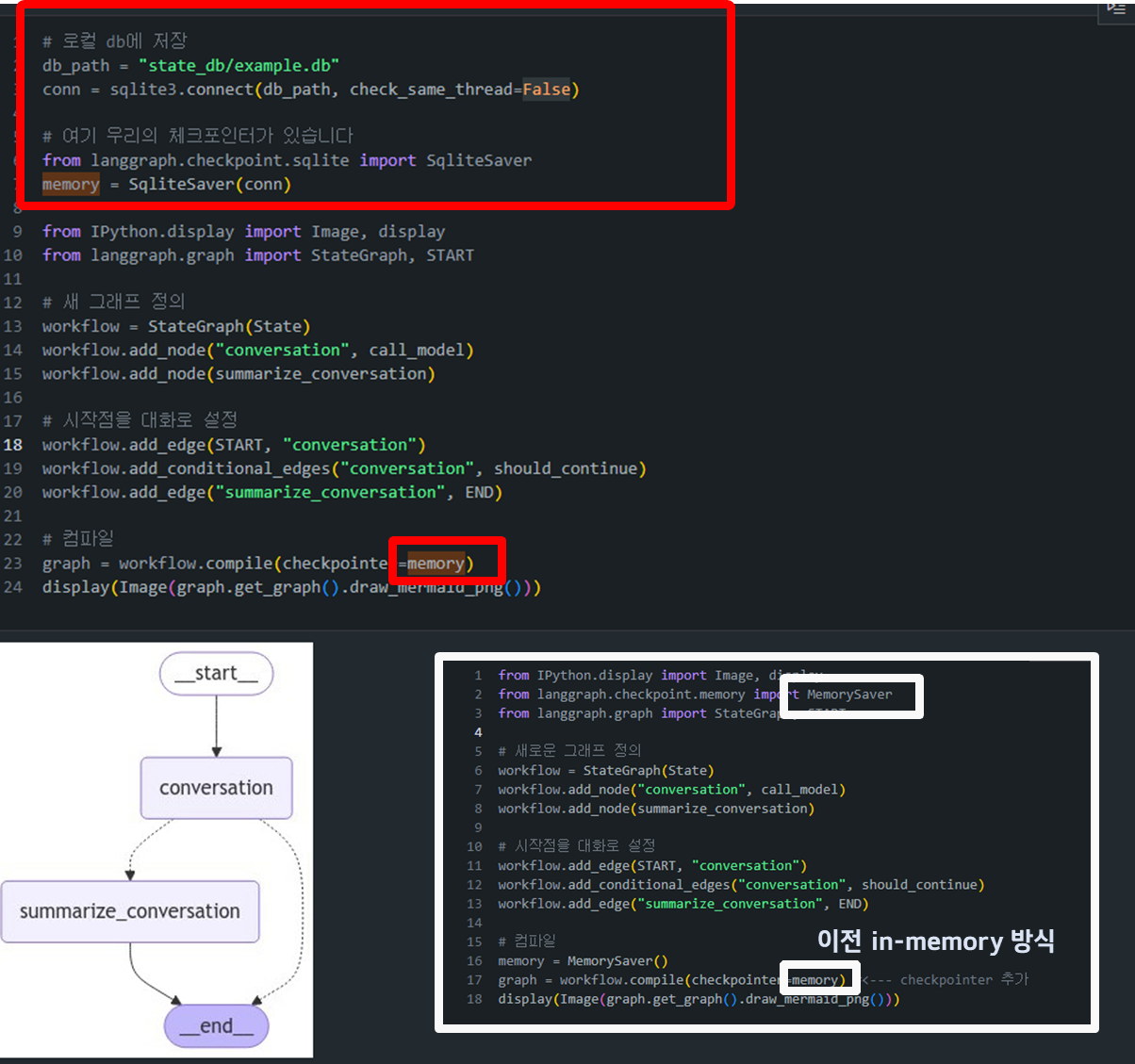
- 차이점 :
- In-Memory:
from langgraph.checkpoint.memory import MemorySaver - External-DB:
from langgraph.checkpoint.sqlite import SqliteSaver그 외에는 공식 지원되는 외부 데이터베이스 체크포인터로from langgraph.checkpoint.postgres import PostgresSaver이 있습니다.
- In-Memory:
- (복습)
-
대화 상태 로드/복구: SQLite를 사용하면 대화 상태가 데이터베이스에 저장되므로, 대화가 길어지거나 세션이 종료되더라도 데이터를 복구할 수 있습니다.
- 예를 들어, 노트북 커널을 재시작하더라도 동일한 SQLite DB를 사용하여 상태를 다시 불러올 수 있습니다. ```
config = {“configurable”: {“thread_id”: “1”}} graph_state = graph.get_state(config) graph_state
1 2 3 4
+ `config`: 대화의 스레드 ID를 지정하는 설정입니다. 여기서는 "thread\_id": "1"이라는 스레드에 해당하는 대화 상태를 가져오는 설정을 하고 있습니다. + `graph.get_state(config)`: 이 메서드는 주어진 config에 맞는 스레드의 대화 상태를 SQLite 데이터베이스에서 불러오는 역할을 합니다. ```
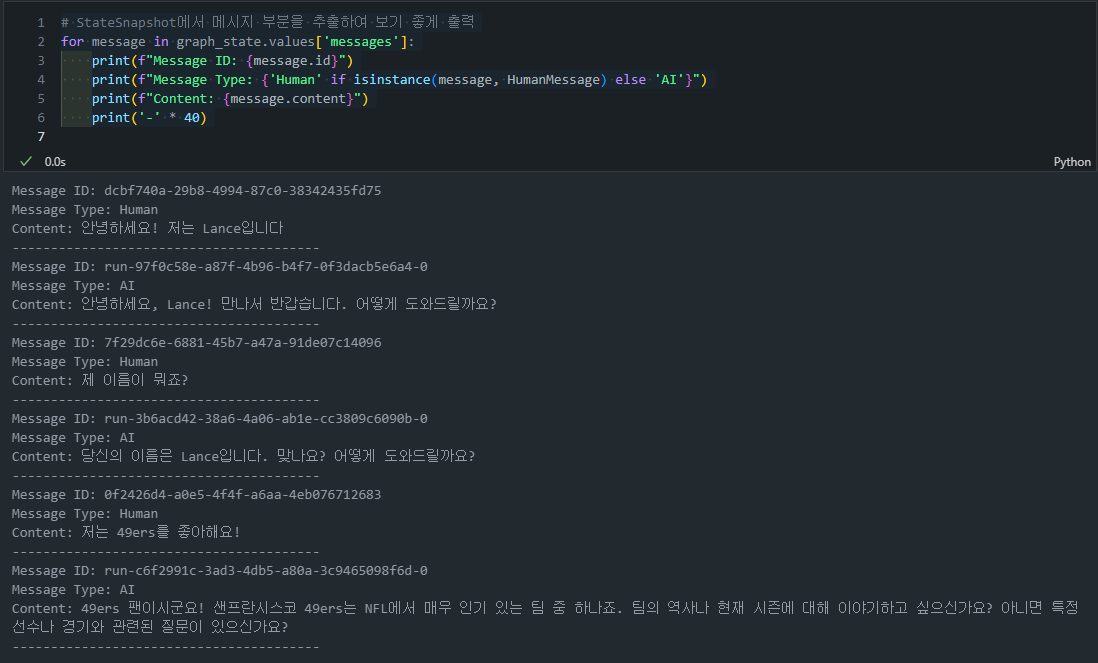
- 유용한 CODE-SNIPPETS: SQLite DB를 호출하고 나서, 아래와 같은 함수들을 통해 정보를 호출할 수 있습니다:
1
2
3
4
5
6
7
8

# StateSnapshot에서 메시지 부분을 추출하여 보기 좋게 출력
for message in graph_state.values['messages']:
    print(f"Message ID: {message.id}")
    print(f"Message Type: {'Human' if isinstance(message, HumanMessage) else 'AI'}")
    print(f"Content: {message.content}")
    print('-' * 40)
-
예시 출력:
1
2
3
4

# 요약 출력
summary = graph_state.values.get('summary', 'No summary available')
print(f"Conversation Summary: {summary}")
-
예시 출력:
