안녕하세요! 오늘 포스팅부터 다음다음 포스팅까지는 CNN 모델의 뼈대가 되는 모델들인 VGGNet, GoogleNet, ResNet을 소개하고 이를 구현해보는 시간을 갖도록 하겠습니다! :) 이번 포스팅은 VGGNet 관련 포스트입니다.
먼저 ILSVRC (Imagenet Large Scale Visual Recognition Challenges)이라는 대회가 있는데, 본 대회는 거대 이미지를 1000개의 서브이미지로 분류하는 것을 목적으로 합니다. 아래 그림은 CNN구조의 대중화를 이끌었던 초창기 모델들로 AlexNet (2012) - VGGNet (2014) - GoogleNet (2014) - ResNet (2015) 순으로 계보를 이어나갔습니다.
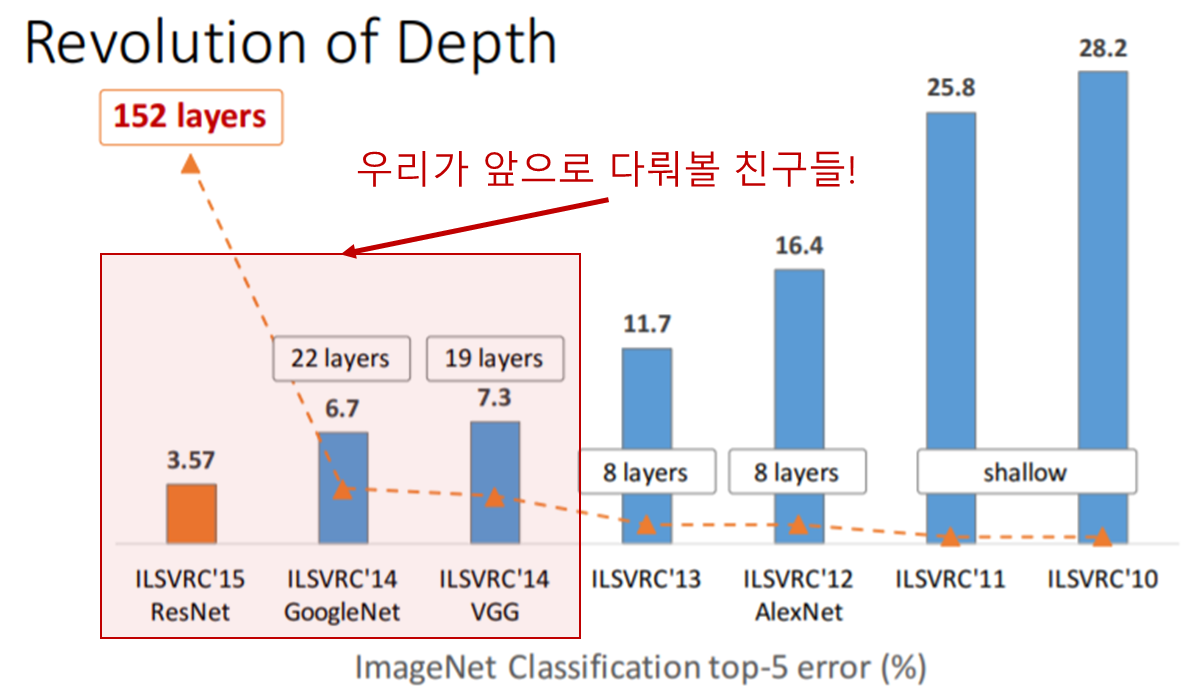
Source : https://icml.cc/2016/tutorials/
위의 그림에서 layers는 CNN layer의 개수(깊이)를 의미하며 직관적인 이해를 위해서 아래처럼 그림을 그려보았습니다.
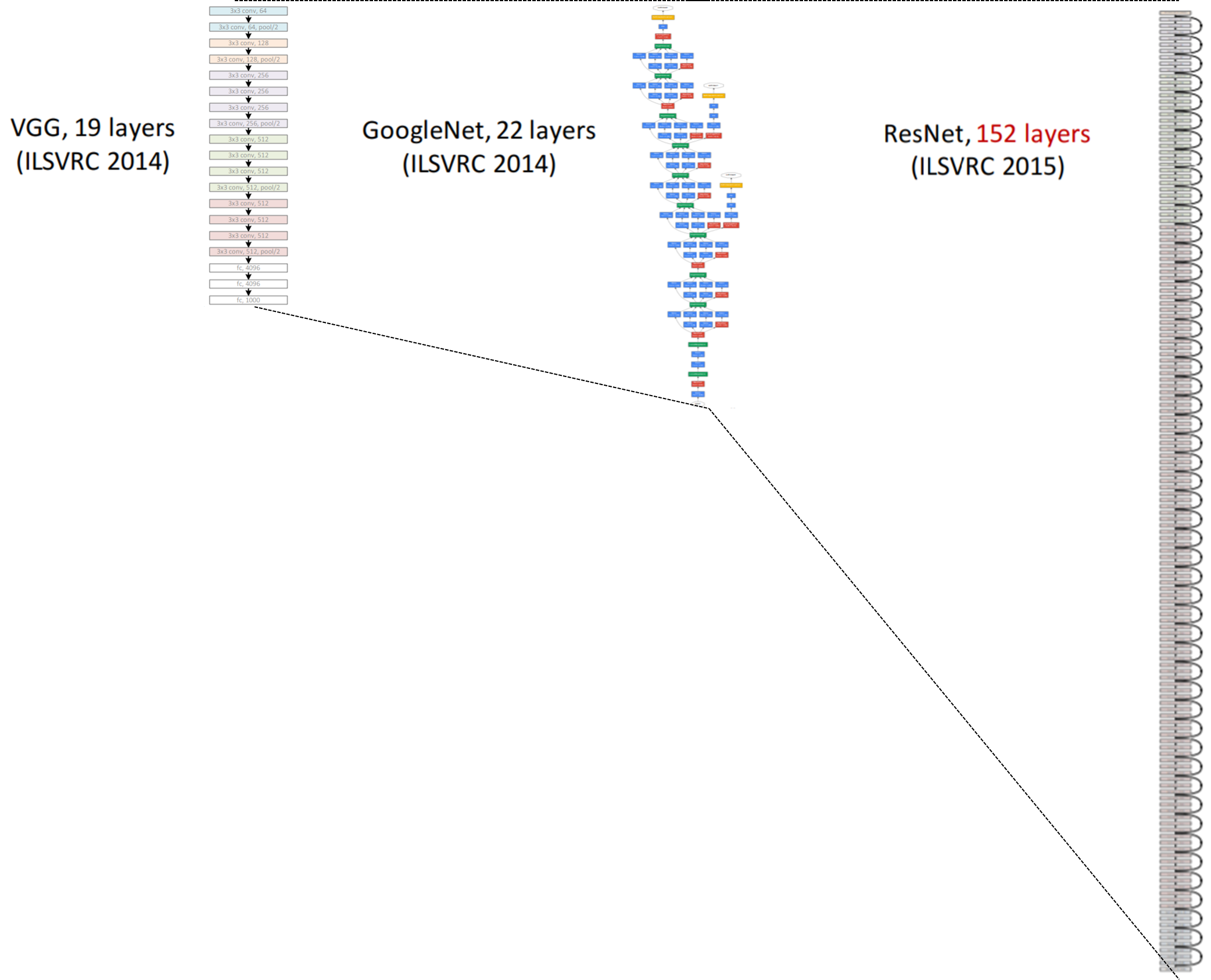
VGGNet 개요
소개
VGGNet이 소개된 논문의 제목은 Very deep convolutional networks for large-scale image recognition로, 다음 링크에서 확인해보실 수 있습니다. 링크
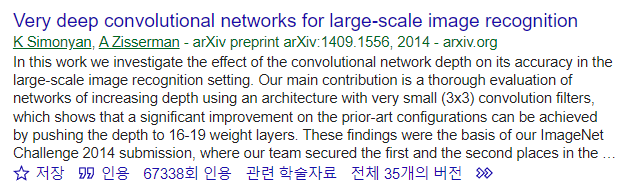
VGGNet은 신경망의 깊이가 모델의 성능에 미치는 영향을 조사하기 위해 해당 연구를 시작하였으며, 이를 증명하기 위해 3x3 convolution을 이용한 Deep CNNs를 제안하였습니다. VGGNet은 ILSVRC-2014 대회에서 GoogLeNet에 이어 2등을 차지하였으나, GoogLeNet에 비해 훨씬 간단한 구조로 인해 1등인 모델보다 더욱 널리 사용되었다는 특징을 갖고 있습니다.
실험설계
모델은 3x3 convolution, Max-pooling, Fully Connected Network 3가지 연산으로만 구성이 되어 있으며 아래 표와 같이 A, A-LRN, B, C, D, E 5가지 모델에 대해 실험을 진행하였습니다.
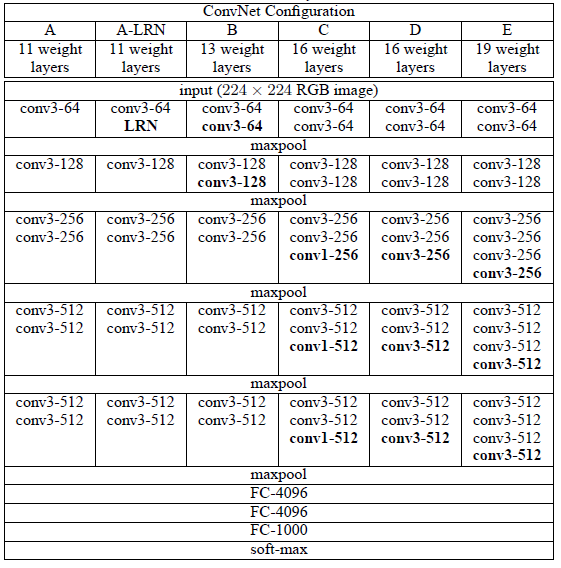
이때 사용한 각각의 window_size와 activation function의 설정을 아래와 같습니다.
- 3x3 convolution filters (stride: 1)
- 2x2 Max pooling (stride : 2)
- Activation function : ReLU
📢 여기서 잠깐!
위 표에서 conv3-64라고 써있는 것은 3x3의 window_size를 갖고 사용한 window의 개수가 64개임을 의미합니다.
성능
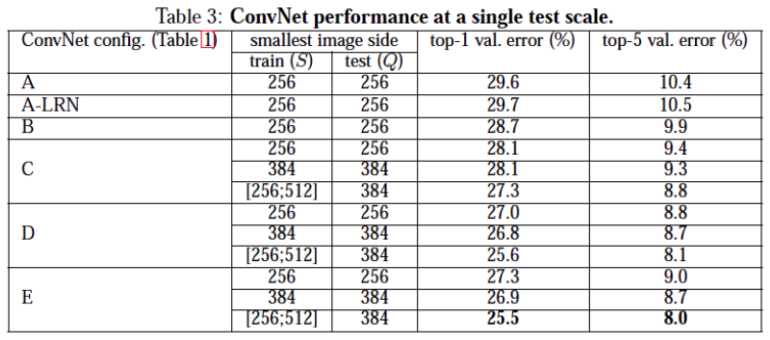
아래 성능표를 통해 우리는 깊이가 깊어질수록 모델의 성능이 좋아지는 것과 Local Response Normalization(LRN)은 성능에 큰 영향을 주지 않는다는 사실을 발견할 수 있습니다.
VGGNet 구현
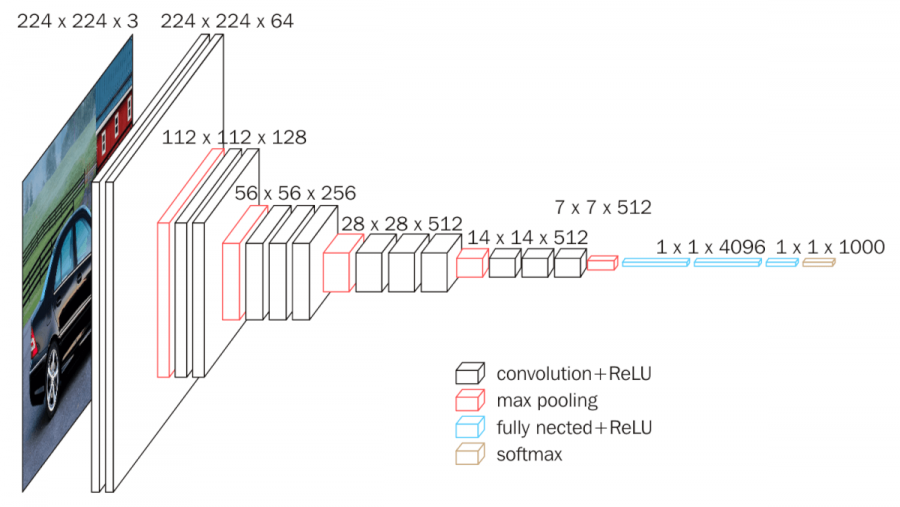
그럼 VGGNet의 개요를 살펴봤으니 이번에는 이를 구현해볼까요? 구현은 위 실험 설계 표의 D열의 셋팅을 구현해보았습니다. 다시 한번 줄글로 해당 구조를 설명하자면 아래와 같습니다.
- 3x3 합성곱 연산 x2 (채널 64)
- 3x3 합성곱 연산 x2 (채널 128)
- 3x3 합성곱 연산 x3 (채널 256)
- 3x3 합성곱 연산 x3 (채널 512)
- 3x3 합성곱 연산 x3 (채널 512)
- FC layer x3
- FC layer 4096
- FC layer 4096
- FC layer 1000
코딩의 편의를 위해 각각 conv layer가 2개 있는 block과 3개 있는 block을 따로 선언하도록 하겠습니다.
conv_2_block
1
2
3
4
5
6
7
8
9
def conv_2_block(in_dim,out_dim):
    model = nn.Sequential(
        nn.Conv2d(in_dim,out_dim,kernel_size=3,padding=1),
        nn.ReLU(),
        nn.Conv2d(out_dim,out_dim,kernel_size=3,padding=1),
        nn.ReLU(),
        nn.MaxPool2d(2,2)
    )
    return model
conv_3_block
1
2
3
4
5
6
7
8
9
10
11
def conv_3_block(in_dim,out_dim):
    model = nn.Sequential(
        nn.Conv2d(in_dim,out_dim,kernel_size=3,padding=1),
        nn.ReLU(),
        nn.Conv2d(out_dim,out_dim,kernel_size=3,padding=1),
        nn.ReLU(),
        nn.Conv2d(out_dim,out_dim,kernel_size=3,padding=1),
        nn.ReLU(),
        nn.MaxPool2d(2,2)
    )
    return model
Define VGG16
1
2
3
4
5
6
7
8
9
10
11
12
13
14
15
16
17
18
19
20
21
22
23
24
25
26
27
28
29
30
class VGG(nn.Module):
    def __init__(self, base_dim, num_classes=10):
        super(VGG, self).__init__()
        self.feature = nn.Sequential(
            conv_2_block(3,base_dim), #64
            conv_2_block(base_dim,2*base_dim), #128
            conv_3_block(2*base_dim,4*base_dim), #256
            conv_3_block(4*base_dim,8*base_dim), #512
            conv_3_block(8*base_dim,8*base_dim), #512
        )
        self.fc_layer = nn.Sequential(
            # CIFAR10은 크기가 32x32이므로
            nn.Linear(8*base_dim*1*1, 4096),
            # IMAGENET이면 224x224이므로
            # nn.Linear(8*base_dim*7*7, 4096),
            nn.ReLU(True),
            nn.Dropout(),
            nn.Linear(4096, 1000),
            nn.ReLU(True),
            nn.Dropout(),
            nn.Linear(1000, num_classes),
        )

    def forward(self, x):
        x = self.feature(x)
        #print(x.shape)
        x = x.view(x.size(0), -1)
        #print(x.shape)
        x = self.fc_layer(x)
        return x
model, loss, optimizer 선언
1
2
3
4
5
6
7
8
9
# device 설정
device = torch.device("cuda:0" if torch.cuda.is_available() else "cpu")

# VGG 클래스를 인스턴스화
model = VGG(base_dim=64).to(device)

# 손실함수 및 최적화함수 설정
loss_func = nn.CrossEntropyLoss()
optimizer = torch.optim.Adam(model.parameters(), lr=learning_rate)
load CIFAR10 dataset
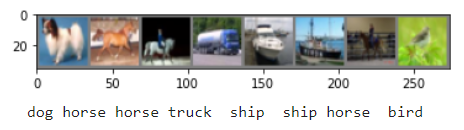
- CIFAR10은 ‘비행기(airplane)’, ‘자동차(automobile)’, ‘새(bird)’, ‘고양이(cat)’, ‘사슴(deer)’, ‘개(dog)’, ‘개구리(frog)’, ‘말(horse)’, ‘배(ship)’, ‘트럭(truck)’로 10개의 클래스로 구성되어 있는 데이터셋입니다.
- CIFAR10에 포함된 이미지의 크기는
3x32x32로, 이는32x32픽셀 크기의 이미지가 3개 채널(channel)의 색상로 이뤄져 있다는 것을 뜻합니다.
TRAIN/TEST 데이터셋 정의
1
2
3
4
5
6
7
8
9
10
11
12
13
14
15
16
17
import torchvision
import torchvision.datasets as datasets
import torchvision.transforms as transforms
from torch.utils.data import DataLoader

# Transform 정의
transform = transforms.Compose(
    [transforms.ToTensor(),
     transforms.Normalize((0.5, 0.5, 0.5), (0.5, 0.5, 0.5))])

# CIFAR10 TRAIN 데이터 정의
cifar10_train = datasets.CIFAR10(root="../Data/", train=True, transform=transform, target_transform=None, download=True)

# CIFAR10 TEST 데이터 정의
cifar10_test = datasets.CIFAR10(root="../Data/", train=False, transform=transform, target_transform=None, download=True)

classes = ('plane', 'car', 'bird', 'cat', 'deer', 'dog', 'frog', 'horse', 'ship', 'truck')
TRAIN 데이터셋 시각화
1
2
3
4
5
6
7
8
9
10
11
12
13
14
15
16
17
18
19
20
21
import matplotlib.pyplot as plt
import numpy as np

# 이미지를 보여주기 위한 함수

def imshow(img):
    img = img / 2 + 0.5     # unnormalize
    npimg = img.numpy()
    plt.imshow(np.transpose(npimg, (1, 2, 0)))
    plt.show()


# 학습용 이미지를 무작위로 가져오기
dataiter = iter(train_loader)
images, labels = dataiter.next()

# 이미지 보여주기
imshow(torchvision.utils.make_grid(images))

# 정답(label) 출력
print(' '.join('%5s' % classes[labels[j]] for j in range(batch_size)))
Source : https://pytorch.org/tutorials/beginner/blitz/cifar10_tutorial.html
TRAIN & TEST
이제 데이터셋도 정의해줬으니 본격적으로 학습 및 검증을 수행해 보도록 하겠습니다. 학습 설정은 다음과 같이 정의해주었습니다.
1
2
3
batch_size = 100
learning_rate = 0.0002
num_epoch = 100
TRAIN
1
2
3
4
5
6
7
8
9
10
11
12
13
14
15
loss_arr = []
for i in trange(num_epoch):
    for j,[image,label] in enumerate(train_loader):
        x = image.to(device)
        y_= label.to(device)

        optimizer.zero_grad()
        output = model.forward(x)
        loss = loss_func(output,y_)
        loss.backward()
        optimizer.step()

    if i % 10 ==0:
        print(loss)
        loss_arr.append(loss.cpu().detach().numpy())
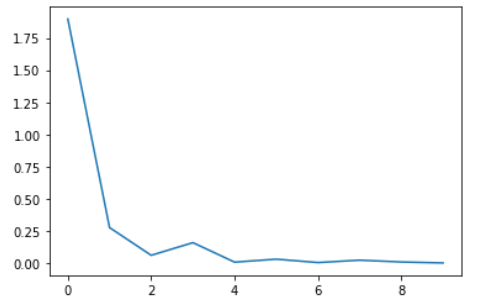
loss 시각화
1
2
plt.plot(loss_arr)
plt.show()
test 결과
1
2
3
4
5
6
7
8
9
10
11
12
13
14
15
16
17
18
19
20
21
22
23
24
25
26
# 맞은 개수, 전체 개수를 저장할 변수를 지정합니다.
correct = 0
total = 0

model.eval()

# 인퍼런스 모드를 위해 no_grad 해줍니다.
with torch.no_grad():
    # 테스트로더에서 이미지와 정답을 불러옵니다.
    for image,label in test_loader:

        # 두 데이터 모두 장치에 올립니다.
        x = image.to(device)
        y= label.to(device)

        # 모델에 데이터를 넣고 결과값을 얻습니다.
        output = model.forward(x)
        _,output_index = torch.max(output,1)


        # 전체 개수 += 라벨의 개수
        total += label.size(0)
        correct += (output_index == y).sum().float()

    # 정확도 도출
    print("Accuracy of Test Data: {}%".format(100*correct/total))
Accuracy of Test Data: 82.33999633789062%
긴 글 읽어주셔서 감사합니다 ^~^